Skip to content

www.rolfje.com

Author: rolfje

Tryout Mac Mini as Fileserver

Posted on 2006-09-20 By rolfje 1 Comment on Tryout Mac Mini as Fileserver

The past 5 years (or more, I can’t remember exactly) I have had a windows server which provided 4 “shares” or “network disks” to the users of my local network. Simplicity was it’s power. All network users would connect with the default windows “Guest” account to prevent complicated logon screens and forgetting of passwords. To prevent damage to files, all shares are read-only, except for one, where people can drop files. Only the administrator of the machine can move the files from the drop box into the different read-only shares. All files on the server were backed up twice a week to a different (physical) drive, and all drives were automatically virusscanned each day and on-access, and defragmented once a week.

My dad is also using this server (we have a wifi bridge between our homes and yes, it is military grade encrypted). A few weeks ago we ran out of diskspace (bought new cameras :-). So we bought a 320GB drive. The old server with the passivly cooled 600MHz pentium 1 processor decided it didn’t like the large drive so we had to upgrade the hardware. I built a new server from my old desktop PC, which was collecting dust because I am now a happy Mac user. When the new server was ready, it was much more noisy than the old one (more fans), and slurped 105 Watts while doing nothing, and up to 140 Watts under booting or serious disk/network access.

Just for fun, we also measured the power usage of my Mac Mini. It was using 40 Watt under heavy disk access, and only 20Watts when doing practically nothing. In sleep mode this even dropped to 3 Watts! This, plus the fact that the PC was producing so much heat that we actually started to worry about it catching on fire when placed inside a closet, convinced my dad to use a Mac Mini as a file server.

The next day, he called me to tell me he had bought a G4 Mac Mini to be used as a fileserver for around 300 Euros. I picked it up and re-installed OSX on it. This only took 30 minutes or so, and I must say that I am pleasantly surprised by the performance of the G4 in comparison with my Core duo Mac Mini with 2GB memory.

Tonight, I installed Sharepoints on it, which is a utility to efectively edit the smb.conf file on your mac. I hooked up an USB disk, and got it running as a samba share in less than 5 minutes, complete with Windows Guest login. Just now, I also managed to make one of the 2 shares readonly, which prooves that the mac Mini can behave itself exectly as the PC server I had to the outside world. This would be great, if I give it the same network name nobody will even notice that their files are now served by a Mac.

I will try to mimic my fileserver completely soon (somewhere next week) and will post a complete description of what the original server did, and what I did to get the Mac Mini to replicate that behaviour.

Now go buy your own Mac Mini G4 and some USB (or better: firewire) harddrives (with spindown capability!) and join me next week in building your mac Mini fileserver. Have a proper place and a proper backup for your files and photos!

Soon, your house will be free of PC’s… 🙂

Apple

“I have not actually read this book”

Posted on 2006-09-04 By rolfje No Comments on “I have not actually read this book”

Funny overview of John Swift’s reviews at Amazon.com…

I have not actually…

Have fun…

Fun

Curing lens envy

Posted on 2006-08-29 By rolfje No Comments on Curing lens envy

Do you still want “that last lens and that’s it”? According to the statistics on this page, you probably already have the right lens in your camera bag. Chances are that you are using your cheapest lens most often. The best quote from this page must be “The cost of the lens is inversely proportional to the frequency of its use.”.

Where did I get that link from? Well, from a brilliant text by Ken Rockwel titled “Your Camera Does Not Matter”. It states that you may not only have overspent on lenses, but on your complete kit alltogether! According to Ken, “Buying new gear will NOT improve your photography.”.

Watching the “Odobenus rosmarus” swimNext time you see a guy with a D200, don’t be impressed. The guy behind him with his old Holga camera could be shooting far better pictures!

I have had a Canon EOS 300 (35mm film), a Canon Powershot A20 and now a Canon 350D. I also have made photo’s with some of my dad’s camera’s, a Canon FT-QL, and an Exa IIB. When changing from one camera to another, my photography (in particular composition) did not change. It just took some trouble away from the process. EOS 200 to Canon A20: no more film hassle. Canon A20 to 350D: Faster bootup and shot-to-shot times. Canon FT-QL and Exa IIB: The romantic feeling of craftsmanship when holding the camera 🙂

Hedge sparrow on a fence, at 200mm, aperture 5.6Sure the 350D gives me nice resolution and more freedom to play with aperture and exposure times and I still like the camera after reading Kens article. But he is right. Period. I recently spoke to a guy who owned an EOS 300 just like I did. He looked at one of my photo’s from the 350D and said “I’ve got to have that camera, how did you do that?”. I explained “aperture” to him and told him that he could do that with his own EOS 300 if he had taken the time to learn how to use it.
I guess some sales people translate “I want a good camera” to “I want to spend a truckload of cash on a camera of which I’ll only use the full-auto mode to shoot pictures of uncle Zed with.” People who don’t know what “aperture” or “exposure time” means just want a snapshot camera which automatically will produce clear, colorful, crisp foto’s of uncle Zed 95% of the time.

Before buying a camera, read Ken’s article, get out of that chair and start shooting with whatever camera you have right now. That one brilliant moment is waiting for you!

Hardware

EyeTV Export, done right

Posted on 2006-08-23 By rolfje 1 Comment on EyeTV Export, done right

A while ago, I bought a Miglia TV max for my Mac Mini. With it, you get EyeTV, the PVR recording software. I was very happy using it, but I recently discovered that all exported MPG files are missing the last part. Arg!

This is a VERY serious bug. It also means that each and every recording I have archived on my external HD is crippled, so I can start all over with collecting series. Lucky as I am, each and every serie gets rerun after rerun on Dutch TV. They have many channels to fill, much commercials to sell and very little (interesting) new material to show.

Read More “EyeTV Export, done right” »

Apple

request a password at the command-line without display

Posted on 2006-08-18 By rolfje No Comments on request a password at the command-line without display

For those of you trying to request a password from the user at the command-line, without the password being displayed on-screen, Java 6 finaly has the answer, along with better access to the console.

I hope that soon we will never see this hideous construction to do the same again.

Software

Apple WWDC 2006 Keynote Address problems?

Posted on 2006-08-10 By rolfje No Comments on Apple WWDC 2006 Keynote Address problems?

Trying to view his Steveness in the Apple WWDC 2006 Keynote addres? Me too, and haven’t been lucky for 3 days in a row. I actually managed to view 3 minutes of distorted, half-audio presentation, but then it died, and has given me an error 400 ever since. It’s not nice to see Apple not being able to cope with the demand. A bittorrent would be nice I guess.

In my first edit of this post I thought I’d found a mirror, but it was an old keynote. Searching on, I found a terrific tip which solved the problem of not being able to view the keynote. It actually turns out it’s the default Quicktime settings are causing the problems. Quicktime fetches the stream over UDP, which makes no guarantee over lost packets. You can set Quicktime to fetch the stream through http, which has a few advantages, such as losless transfer of data, and ability for proxy server to cache data.

To set Quicktime to fetch the video accros http:

  • Go to System Preferences
  • Open Quicktime preferences from the system preferences screen
  • Click on the “advanced” tab
  • Choose “Custom” for transport setup
  • In the window that pops up, choose the HTTP transport protocol
  • Close the system preferences

Now go to the WWDC 2006 Keynote address page and view the video. I just did, it worked fine, no dropped frames or audio.
Enjoy.

p.s. Tiger shipped for 80 euro’s when it was released. If Leopard is anywhere close to that same price, it will be hard to find an operating system which gives you all this, with this quality, for this price. Professional grade OS, for the price of a SuSe distribution! I love Tiger, I know I’m going to love Leopard. Since I have my Mac, my Windows laptop (which was an expensive one I might add) is sitting in a corner of my desk, covered under a layer of dust. It’s simply not good enough anymore. My Mac mini will beat it any day.

Apple

Betutteling in Nederland duurt voort

Posted on 2006-08-04 By rolfje No Comments on Betutteling in Nederland duurt voort

We zijn al redelijk ver in Nederland met de regelgeving. Steeds meer regeltjes die dingen regelen waarvan je zou kunnen bedenken dat als je normaal gezond verstand hebt, dat zelf ook kunt bedenken. Gordels om bijvoorbeeld. Als je dat niet doet, wie heb je er dan mee? Jezelf! Moet de regering nou echt gezonde, volwassen mensen tegen zichzelf beschermen? Ik zeg: natuurlijke selectie toepassen.

Het word natuurlijk wat anders als het gaat om situaties waarbij mensen iemand anders in gevaar brengen. Hard rijden op een motor? Prima, op een lege snelweg. Hardrijden op een motor door een woonwijk? Rijbewijs en motor kwijt. Korte metten. Het probleem is niet het apparaat, maar de bestuurder. Kijk, net zoals die leuke minibikes. Als je daar verstandig mee omgaat, zie ik het probleem er niet van. Maarja, de Nederlandse regering zou de regering niet zijn als ze er niet iets aan doen.

Zelf heb ik zo’n leuke electrische step gekocht een jaar of wat geleden. Als ik er op rijd, word ik lachend ingehaald door kleine kinderen op kleine stepjes. Toch vind de regering dat ik het ding zou moeten “goedkeuren voor de openbare weg” en “verzekeren” en het liefst zien ze vast ook nog dat ik een helm, scheenbeschermers, gebruik. Naast de airbags die op de scooter moeten zitten natuurlijk. Tegelijkertijd kun je met een normaal auto-rijbewijs zonder helm de snelweg opduiken met een trike of quad. Dan moet de quad wel gordels hebben. Lekker nuttig. Over krom gesproken.

Nederland is het gezonde verstand voorbij.

Uncategorized

Free Beanbag!

Posted on 2006-07-21 By rolfje No Comments on Free Beanbag!

When you are using a (digital) camera and need to place it on an uneven surface to keep it still long enough for your long shutter speeds, or you want to make a shot on the release timer (or both), you’ll need a tripod, or a beanbag. A beanbag is an ideal option, you can tuck it into your backpack, take it everywhere you need and it fits all camera’s.

Sure, you can buy a beanbag from a nice company like this, and spend about 30 euro’s or more. But, If you’ve got a needle, thread, a T-shirt or linnen bag, and some rice, you can make one for free!

Read More “Free Beanbag!” »

Hardware, Workshop

Sharpening, denoizing, smoothing, enhancing, vandalizing!

Posted on 2006-07-17 By rolfje No Comments on Sharpening, denoizing, smoothing, enhancing, vandalizing!

To every photo-editing, image-manipulating, red-eye-reducing software developer on the planet: Sharpening photographs by default is NOT a good idea! If images aren’t sharp directly from the camera, there was something wrong with them to begin with. Most camera’s nowadays make fine pictures which don’t need sharpening.

Read More “Sharpening, denoizing, smoothing, enhancing, vandalizing!” »

Uncategorized

Google Blogoscoped Monitor Chain

Posted on 2006-07-17 By rolfje No Comments on Google Blogoscoped Monitor Chain

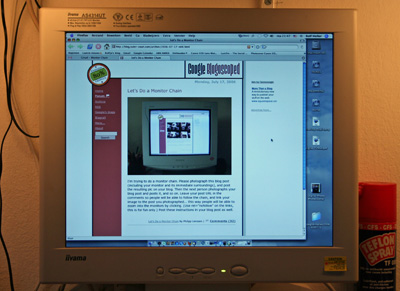
I noticed the start of a “Monitor Chain” on the “Google Blogoscoped” blog. I liked the idea, so here it goes:

Monitor Chain

Please photograph this blog post (including your monitor and its immediate surroundings), and post the resulting pic on your blog. Then the next person photographs your blog post and posts it, and so on. Leave your post URL in the comments of the blog you photographed so people will be able to follow the chain back up (zoom out), and link your image to the post you photographed… this way people will be able to zoom into the monitors by clicking. (Use rel=”nofollow” on the links, this is for fun only.) Post these instructions in your blog post as well.

Have fun!

Note 11 November 2007: This post has been migrated from blogger.xs4all.nl, the original chain is probably now broken. Sorry.

Fun

Posts navigation

Previous 1 … 29 30 31 … 36 Next
         

Recent Comments

  • rolfje on Exit WordPress
  • Guus on Exit WordPress
  • rolfje on Exit WordPress
  • rolfje on Methode Buijs uitgelegd
  • LinkedIn is at Peak Enshittifaction – Will Chatham's Blog on Linked-In not really Opt-in?

Tags

Apple backup design DIY DRM eclipse environment fix Fun gmail google hacking hamradio Hardware helicopter iphone ipod iTunes Java Keynote linux modelling motorcycle music news opinion oracle osx photo photography programming repair review security Software technology Time Machine Twitter Ubuntu usability Utilities vacation vista windows Workshop

Categories

  • Apple (105)
  • Divorce (1)
  • Electronics (3)
  • Fun (57)
  • Games (7)
  • Hardware (72)
  • Microsoft (18)
  • Racing (15)
  • Software (138)
  • Uncategorized (68)
  • Workshop (20)

Archives

Brought to you without adds, banners, cookies or tracking. This one is on me. Yes, life can be this good. Pay it forward.

Copyright © 2026 www.rolfje.com.

Powered by PressBook WordPress theme