 When you use AWS (Amazon Web Services) and need to access your EC2 machines, you have a few options. I think most people end up using the in-browser terminal console or the aws cli to connect to their machines, or opening the ssh port add keys there to directly connect using ssh. In most professional (production) environments this is blocked (for several good reasons). There is however a nice way to be able to connect to your machine with an ssh client through the aws ssm command line interface. Let me take you through the mechanics and then give you a nice script and config example which allows you to use ssh as if you were living in the good old days 🙂
Tag: linux
Add iptables to your node-exporter metrics
 This time quick and simple trick to make your node_exporter report on the number of blocked and allowed packets by iptables. It involves a tiny script, and a small configuration change to the node_exporter. Here we go:
Installing GPG keys for Debian Backports
 For Let’s Encrypt to automatically renew certificates on your Raspberry Pi, you probably want to install certbot. The installation instructions of certbot tell you to make use of the Debian Backports packages. Following the instructions to install backports packages into apt-get on raspbian (which is a Debian Jessie), you will probably run into the following error:
$ sudo apt-get update
...
W: GPG error: http://ftp.debian.org jessie-backports InRelease:
   The following signatures couldn't be verified because the public
   key is not available: NO_PUBKEY 8B48AD6246925553 NO_PUBKEY
   7638D0442B90D010
Strange fix for SMB problems in Linux
 Last week, the upgrade to Ubuntu 11 severely broke all carefully selected menu colors, graphics settings and icon sets. I gave up the fight after a few hours of effortless restoration work and switched to Linux Mint 11.
While setting up my machine and restoring the links to the company Windows file servers I could not connect. The password window would re-appear without any feedback. The fix was even stranger than the problem.
Installing Wubi 9.10
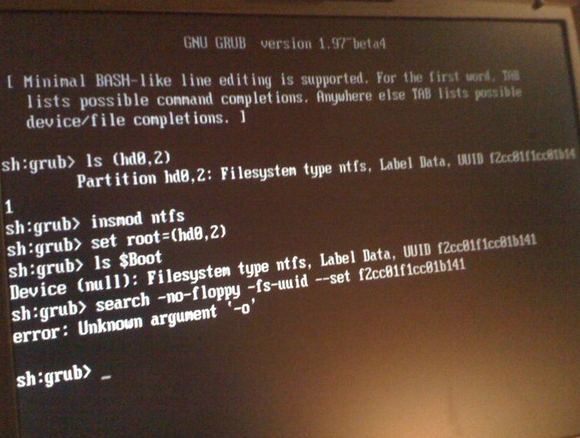 Ok, fist of all: DO NOT DOWNLOAD WUBI 9.10 as it contains a serious GRUB2 problem which will give you some headaches if you’re new to Linux. Why I’m saying this? I just ran into this GRUB2 problem while installing the new Wubi 9.10. Here’s what I did:
- Downloaded Wubi 9.10 windows installer and ran it.
- Installer downloads stuff, and boots into Ubuntu installer
- After reboot, GRUB screen comes up with a loud beep and a prompt. Great.
Some googling finds a lot of Linux voodoo talking l33tspe4king nerds, but it did contain some info with which I managed to get things working: