 When you use AWS (Amazon Web Services) and need to access your EC2 machines, you have a few options. I think most people end up using the in-browser terminal console or the aws cli to connect to their machines, or opening the ssh port add keys there to directly connect using ssh. In most professional (production) environments this is blocked (for several good reasons). There is however a nice way to be able to connect to your machine with an ssh client through the aws ssm command line interface. Let me take you through the mechanics and then give you a nice script and config example which allows you to use ssh as if you were living in the good old days 🙂
Tag: Software
The podcast problem (fixed)
 I love to listen to podcasts in the car. It has a lot of benefits over other media types, has less commercials, and there is some pretty good content out there. Documentaries, stories, news, perfect for listening on your commute. There is one big downside to podcasts though, particularly with the podcasts produced by people who have no experience with audio. So I went on a mission to solve this.
Post-quantum key exchange
If you see this warning when connecting to a server through ssh:
** WARNING: connection is not using a post-quantum key exchange algorithm.
** This session may be vulnerable to "store now, decrypt later" attacks.
** The server may need to be upgraded. See https://openssh.com/pq.html
Then follow michabbb’s guide on how to enable post-quantum key exchange in ssh. Don’t worry, you don’t have to generate new keys. Please please do not disable the warnings, Solution 1 is NOT a solution. Do the right thing.
On your (MacOS) client machine (your local laptop) you need to tell your client to prefer post-quantum algorithms. Edit ~/.ssh/config and make sure your Host entry contains a KexAlgorithms line like this:
Host *
    KexAlgorithms sntrup761x25519-sha512@openssh.com,curve25519-sha256,curve25519-sha256@libssh.org
On a (MacOS) server you need to tell the sshd deamon to prefer post-quantum algorithms. To help you quickly do this:
sudo tee /etc/ssh/sshd_config.d/post-quantum.conf >/dev/null <<'EOF'
# Enable post-quantum key exchange algorithms
KexAlgorithms sntrup761x25519-sha512@openssh.com,curve25519-sha256,curve25519-sha256@libssh.org,ecdh-sha2-nistp256,ecdh-sha2-nistp384,ecdh-sha2-nistp521,diffie-hellman-group-exchange-sha256,diffie-hellman-group16-sha512,diffie-hellman-group18-sha512,diffie-hellman-group14-sha256
EOF
sudo launchctl unload /System/Library/LaunchDaemons/ssh.plist
sudo launchctl load -w /System/Library/LaunchDaemons/ssh.plist
Then validate that it worked on your next ssh session. If not, check that both machines (client and server) contain these fixes and are up-to-date. Read michabbb’s article for more tips and a better explanation.
Stay safe!
How to tail a json log file
 Many applications nowadays output json formatted log files so that they can be scraped by the newest hippest monitoring cluster (think of Splunk, Elastic Filebeat, etc). That is of course very nice and I applaud that kind of observability, but sometimes you are just on the machine fighting with a service that does not want to start, or you just want to monitor it a bit more realtime, or you just are not the browser type. Luckily there is a realatively easy trick to this.
Are you de-skilling?
 This week a colleage of mine shared an interesting video describing AI (mainly Suno) as problematic to the musical industry in the sense that musicians will become less and less skilled in making truly original music. It coins the term “de-skilling”, which perfectly captures something I also see in the software development area, even though it is beautifully hidden by the “impressive results”.
How to get your users to install JCE
 In every Java project where I need to do strong cryptography, I run into these dreaded unreadable stacktraces which send you into the woods. After a long search I usually discover that the Unlimited Strength Java Cryptography Extensions are not installed. To prevent frustration of users of your software, you can simply add a bit of informative logging to help him/her solve it when the solution is known.
Ibatis Inline Parameter Maps
 Today I (re)discovered a feature in the Ibatis data mapper framework which was clearly documented, but for some reason was not being used in our project. The feature is called “inline parameter maps” and combined with a wrapper bean it can clean up a lot of clutter in the code and in the SqlMaps. Please feel free to share this example with your fellow Ibatis Data Mapper 2 framework users.
Migrate from Password Gorilla to KeePass
 I used to use Password Gorilla to store my passwords, because it can run on both Mac and Windows. Because my password database keeps growing, Password Gorilla is becomming a very slow starter, even on my new solid state disk. A few weeks ago I learned that KeePass is a much more modern application, and is available for both Mac and Windows. Here’s what I did to get all my passwords into KeePass:
Care vs Careless
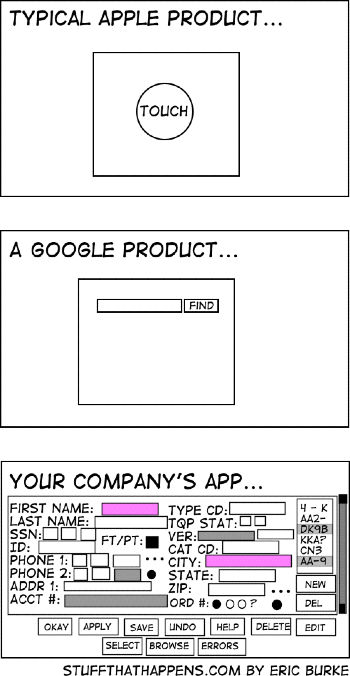
It’s frightening to realize how close to the truth Eric Burke is.
Choose: AFP or SMB
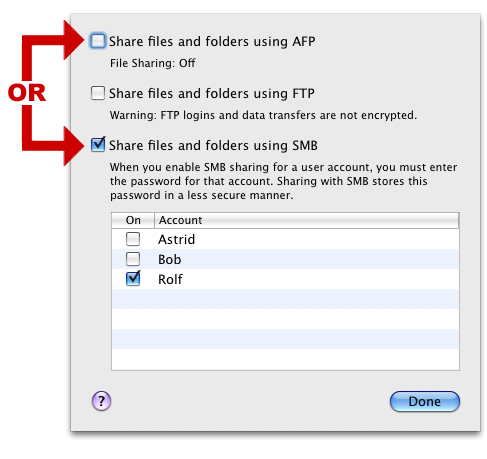
I recently upgraded the operating system on my trusty Mac Mini G4 home fileserver from Tiger to Leopard. In addition to the out-of-the-box backup, I no longer have to use SharePoints to manage my network shares. In Leopard, I can just right-click them and arrange the sharing.
In doing so, I decided to switch on both SMB and AFP sharing for all shares. The idea was that my Macs all would use AFP automatically, and all Windows machines would see the SMB mounts. After a few hours, iTunes began acting up on me, because it decided to switch between the SMB and AFP protocol (or so it seemed). Finder also seems to have some trouble listing network shares if the exact same name on the same server is shared with two different protocols.
Because there are people on my network with Windows machines, I decided to switch off the AFP protocol and only go with SMB. I haven’t had problems since.
If you’re sharing drives like I’m doing, go for SMB. It may not be the technically superior solution, but it will “just work”. You can easily switch to AFP when the world is freed of Windows machines. 😉