 I love to listen to podcasts in the car. It has a lot of benefits over other media types, has less commercials, and there is some pretty good content out there. Documentaries, stories, news, perfect for listening on your commute. There is one big downside to podcasts though, particularly with the podcasts produced by people who have no experience with audio. So I went on a mission to solve this.
Category: Apple
Post-quantum key exchange
If you see this warning when connecting to a server through ssh:
** WARNING: connection is not using a post-quantum key exchange algorithm.
** This session may be vulnerable to "store now, decrypt later" attacks.
** The server may need to be upgraded. See https://openssh.com/pq.html
Then follow michabbb’s guide on how to enable post-quantum key exchange in ssh. Don’t worry, you don’t have to generate new keys. Please please do not disable the warnings, Solution 1 is NOT a solution. Do the right thing.
On your (MacOS) client machine (your local laptop) you need to tell your client to prefer post-quantum algorithms. Edit ~/.ssh/config and make sure your Host entry contains a KexAlgorithms line like this:
Host *
    KexAlgorithms sntrup761x25519-sha512@openssh.com,curve25519-sha256,curve25519-sha256@libssh.org
On a (MacOS) server you need to tell the sshd deamon to prefer post-quantum algorithms. To help you quickly do this:
sudo tee /etc/ssh/sshd_config.d/post-quantum.conf >/dev/null <<'EOF'
# Enable post-quantum key exchange algorithms
KexAlgorithms sntrup761x25519-sha512@openssh.com,curve25519-sha256,curve25519-sha256@libssh.org,ecdh-sha2-nistp256,ecdh-sha2-nistp384,ecdh-sha2-nistp521,diffie-hellman-group-exchange-sha256,diffie-hellman-group16-sha512,diffie-hellman-group18-sha512,diffie-hellman-group14-sha256
EOF
sudo launchctl unload /System/Library/LaunchDaemons/ssh.plist
sudo launchctl load -w /System/Library/LaunchDaemons/ssh.plist
Then validate that it worked on your next ssh session. If not, check that both machines (client and server) contain these fixes and are up-to-date. Read michabbb’s article for more tips and a better explanation.
Stay safe!
Apple Watch 8 Uninstalled
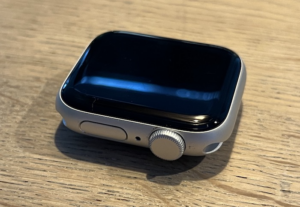 After wearing a simple Pulsar analog watch for years, and then not wearing a watch at all, I convinced myself a month ago that an Apple Watch 8 would be an improvement. Part of that decision was based on my hipster IT colleagues being surprised I was not wearing a smartwatch. I also noticed my girlfriend practically can’t live without hers, and then I saw this endless stream of youtube videos with raving reviews of (lets be honest) pretty biased people.
macOS Sierra SSH “Permission Denied”
 If you used DSA keys to log in to your SSH server and have upgraded your client machine to macOS Sierra (or OSX Sierra if you like), you probably ran into this problem:
client$ ssh -p 8123 george@10.0.0.10 -i ~/.ssh/id_dsa
Permission denied (publickey).
The answer to this problem is replacing the DSA key with an RSA key, but how do you do on the server when your only means for connecting is the OSX client machine you just upgraded? Here’s how:
From the Finder to the Shell (and back)
A quick tip for OSX users out there who frequently need to open a Terminal window for the current location in the finder, or the other way around:
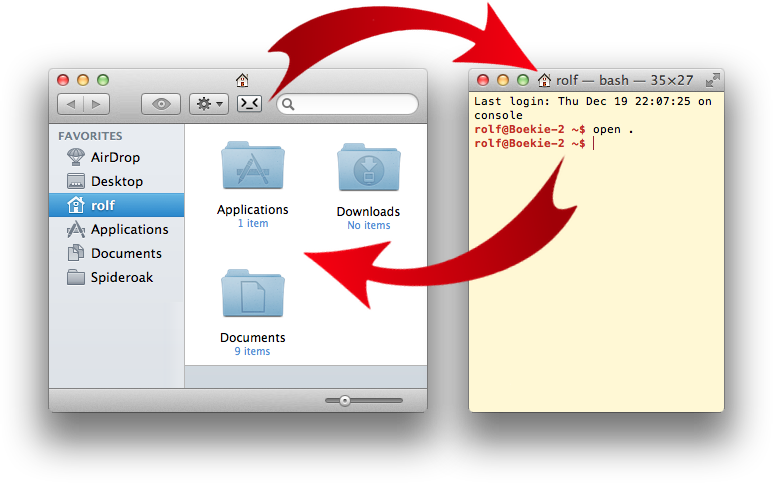
Install the free application from the App Store: Go2Shell. It will give you an icon on the toolbar of your Finder, and pressing it will open a Terminal window and automatically change it’s directory to match the Finder’s location.
The other way around is easier; you can already do that on any Mac. Simply type “open .” (that’s the word “open”, followed by a space and a period). This command will open a Finder window for the directory location your Terminal window is in.
Bonus tip: Also check the “open -t [filename]” command, it will open your system’s default text editor with the given file.
iOS7 hidden features
 If you’ve just installed iOS7 and like it as much as I do, you are probably interested in all the new features of it, and where to find them. On behalf of Apple, I’ll be happy to point out where all those neat new features are, and share my happiness about this wonderful new magical market-leading mobile OS.
Open letter to Keith Lang about Skitch
 Dear Keith,
I read your letter about Skitch and would like to respond to all that has happened from my end-user perspective.
I am a long-time Evernote user and fan. Evernote changed note taking by being truly searchable. I can confidently drop all the websites, receipts, todos and ideas in there, and clear my mind of the “I must remember that” burden. The OCR of Evernote works beautifully on photos of whiteboards, making even my whiteboard notes searchable.
In 2010, I discovered Skitch. The simplicity and razor sharp focus on anotating a screencapture and share the anotated image by dragging it anywhere was sheer brilliance. My daily work includes making annotated screenhots and mailing them to team members to discuss improvements. Skitch changed this ugly capture-save-edit-save-attach-send cycle to pure poetry in motion. Dragging images into Evernote even made my screenshots searchable. It instantly became second nature and my go-to image tool.
Make your buildserver talk
 Have you ever started a shell script which takes a while and you keep monitoring that window because you really need those results? If you are working on a Mac, you can use the Mac’s power of speech to tell you a command is finished. Here’s how:
./yourreallyslowbuild.sh; say "really long build is finished"
With a little curl and shell scripting magic, I told my Mac to constantly monitor our Jenkins buildserver, and bug everybody in the office when the hourly build is failing:
Steve Jobs’ yacht launched, named “Venus”
http://www.youtube.com/watch?v=DZh4aSszD5k
Today Steve Job’s yacht was launched from a dock a few miles from my house. I went there with some friends and we shot some awesome footage of this incredible ship. Through the glass, we could see the 7 iMacs which are used to control the ship. There are also large doors on the side and the back, I suspect these will be used to launch boats or jetskis into a nice warm Mediterranean water.
Toyota (Corolla Verso) iPhone Bluetooth connection
 My sisters in law bought a beautiful 2006 Toyota Corolla Verso. They could not get the iPhone to pair with the car’s Bluetooth system. The dealer told them that this was an iPhone problem, but after some fiddling, it turns out there is a simple workaround. If you want to pair an iPhone to your car, and the car says “pairing failed” as soon as you tap on your iPhone, this simple trick might help for you. This article contains detailed steps for the Toyota Corolla Verso, but on other cars this might work too.