Author: rolfje
Ibatis Nullpointer calling stored procedure
package com.rolfje.foo
public class BarBean {
private String barName;
private Long barId;
... setters/getters here ...
}
A straightforward parametermap:
<parameterMap class="com.rolfje.foo.BarBean"
id="barbeanMap">
<parameter property="barName" />
<parameter property="barId" />
</parameterMap>
and a straightforward procedure mapping:
<procedure id="insertBar" parameterMap="barbeanMap">
{ call store_bar (
?,?)
}
</procedure>
When trying to call the stored procedure, she got the following stacktrace:
org.springframework.jdbc.UncategorizedSQLException: SqlMapClient operation; uncategorized SQLException for SQL []; SQL state [null]; error code [0]; --- The error occurred in com/rolfje/foo/sqlmaps/ParameterMap.xml. --- The error occurred while applying a parameter map. --- Check the barBeanMap. --- Check the statement (update procedure failed). --- Cause: java.lang.NullPointerException; nested exception is com.ibatis.common.jdbc.exception.NestedSQLException: --- The error occurred in com/rolfje/foo/sqlmaps/ParameterMap.xml. --- The error occurred while applying a parameter map. --- Check the barBeanMap. --- Check the statement (update procedure failed). --- Cause: java.lang.NullPointerException Caused by: java.lang.NullPointerException Caused by: com.ibatis.common.jdbc.exception.NestedSQLException: --- The error occurred in com/rolfje/foo/sqlmaps/ParameterMap.xml. --- The error occurred while applying a parameter map. --- Check the barBeanMap. --- Check the statement (update procedure failed). --- Cause: java.lang.NullPointerException Caused by: java.lang.NullPointerException at ...executeQueryWithCallback(GeneralStatement.java:188) at ...executeQueryForObject(GeneralStatement.java:104) at ...queryForObject(SqlMapExecutorDelegate.java:565) ...
After hours of staring at the problem, and comparing code with similar constructions from other projects, we decided to switch to the Oracle 9i thin driver to see if that would solve the problem. It didn’t, but there was an interesting development: The Oracle 9i driver actually gave us a decent error about not being able to parse the SQL statement. Which brings us to…
The solution:
We removed all layout from the procedure mapping, which resulted in:
<procedure id="insertBar" parameterMap="barbeanMap">
{call store_bar (?,?)}
</procedure>
This solved the problem. Then we switched back to the Oracle 10i thin driver, and the problem was still gone. The problem lies in the TAB between the left curly bracket and the word “call”. Oracle can not handle this.To investigate this problem, we then also tried to insert <![CDATA[ ]]> around the procedure call, but as soon as there is a TAB between the { and the word “call” iBATIS will throw a NullPointer. The strange thing is that you can have spaces, newlines and tabs *anywhere* in the procedure mapping, as long as there is no TAB between the left curly and the word “call”.
It ain’t what you do…
Tangerine BPM Analyzer
Today I discovered Tangerine, a BPM (Beats Per Minute) analyzer for use with iTunes on a mac. I downloaded it, and it works as advertised. It scans your iTunes music library, and analyzes the BPM (and intensity of the pattern) of each track. It does this in the background, and on my Mac mini Core duo I can continue wih my normal programs while Tangerine analyzes the tracks. The BPM values get saved to your iTunes library, so they will also show up in iTunes if you have the BPM column visible there. The “Intensity” will not be visible in your normal iTunes lists.
Welcome www.rolfje.com readers!
Because the update process of my old site was much more hassle than typing a post, I noticed that my blog was better maintained than my site. Therefore I have decided to redirect traffic to my domain (rolfje.com) to my blog. You can still find the original content of www.rolfje.com at http://www.xs4all.nl/~rrolfje/.
Monique Pels
This morning, Monique Pels passed away after a long period of illnes. Even though I’ve only met Monique a few times, she always left the impression of being a strong, witty, and loving person who enjoyed every minute of life. I can only imagine how big this loss must be for her family, relatives and friends.
My condolences to Bert, Nikita, Indy, Marianne, Ton, Vincent, Annemieke and Jaimey. I wish them all the strength to cope with this loss.
Part of this text was sent to ian king to be placed on the Monique Pels Tribute Page. If you would like to send your own tribute then please E-Mail ian@kingracing.com.
Other places with tributes for Monique:
eurodragster.com
Ian’s Pitlane Gossip
German Drag Racing board
OSX: USB Fat32 drives trouble samba
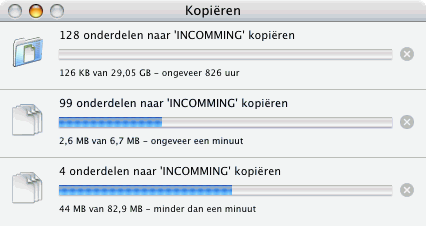
Okay, I found the answer to my problem. Mounting an USB drive on OSX which is formatted as Fat32, will not behave nicely when being accessed through samba. Trying to start multiple copy processes simultaniously will cause seemingly random “file locked” errors. I just formatted the drive as HFS+, and the problem dissapeared. This is a screenshot you’d expect when copying, but I was very happy to see it just a minute ago:

Now that I’ve cleared that problem, I can start working on the backup and virusscanning processes, and writing a nice “how to” so you can do the same with your mac mini!
I should have done this right away like I planned. HFS+ is far better than Fat32 (journalled, auto-defragmenting, case preserving, and better in preserving file integrity).
Samba shares and USB drives
I am very close to migrating the data on my bulky PC to my new Mac Mini fileserver and mounting the IDE drives in the USB drive brackets. Once I’ve done this, I will have the screenshots and data to write a nice “how to” on using the Mac Mini as a file server. There is however one slight problem which could prove to be a showstopper…
Samba test 1: local directories.
I created a directory in the root of the HD in the mac mini, and made it R/W for everybody. Then, I used SharePoints to make it available to all password-less Guest users on the network (which happens to be the default Windows user for connecting to drives without asking for a password). All was well. I could access the share, and could copy as many files from as many machines imultaniously as I wanted.
Samba test 2: USB mounted volumes.
I mounted a HFS+ formatted USB disk to the Mac Mini, and made it available to the network in the same way as in test 1. Everything seemed to be working fine and as expected, but while running some tests I discovered a strange thing: I can only copy files onto the USB drive from 1 machine at a time, 1 file at a time. When starting a new copy while allready in the process of copying an older file, one or both copy jobs crashed with a “file in use” error.
I am now trying to find out what is causing this problem. I have a firewire drive I can use to determine if it is the USB protocol or driver which is causing this problem, or if it is the fact that it is a mounted volume alltogether. If anybody has tips I’m glad to hear them. Meanwhile I’ll be searching the web…
Update
Using a firewire drive does not solve the problem. I did find some articles on fast user switching which state that only 1 user can access pheripherals at a time. This seems to be related to this problem.
Update 2
Creating a symlink to the mounted volume and sharing the link through samba will not change behaviour. I was expecting this, but tried anyway because it only costs 1 minute to test. Maybe a virtual drive would be an option. I can create virtual RAID disks in OSX, but I don’t want my setup to be complex. This will add to the complexity when recovering from a sever crash. Simple, full and fast recovery from hardware problems is my top priority.
Tryout Mac Mini as Fileserver
The past 5 years (or more, I can’t remember exactly) I have had a windows server which provided 4 “shares” or “network disks” to the users of my local network. Simplicity was it’s power. All network users would connect with the default windows “Guest” account to prevent complicated logon screens and forgetting of passwords. To prevent damage to files, all shares are read-only, except for one, where people can drop files. Only the administrator of the machine can move the files from the drop box into the different read-only shares. All files on the server were backed up twice a week to a different (physical) drive, and all drives were automatically virusscanned each day and on-access, and defragmented once a week.
My dad is also using this server (we have a wifi bridge between our homes and yes, it is military grade encrypted). A few weeks ago we ran out of diskspace (bought new cameras :-). So we bought a 320GB drive. The old server with the passivly cooled 600MHz pentium 1 processor decided it didn’t like the large drive so we had to upgrade the hardware. I built a new server from my old desktop PC, which was collecting dust because I am now a happy Mac user. When the new server was ready, it was much more noisy than the old one (more fans), and slurped 105 Watts while doing nothing, and up to 140 Watts under booting or serious disk/network access.
Just for fun, we also measured the power usage of my Mac Mini. It was using 40 Watt under heavy disk access, and only 20Watts when doing practically nothing. In sleep mode this even dropped to 3 Watts! This, plus the fact that the PC was producing so much heat that we actually started to worry about it catching on fire when placed inside a closet, convinced my dad to use a Mac Mini as a file server.
The next day, he called me to tell me he had bought a G4 Mac Mini to be used as a fileserver for around 300 Euros. I picked it up and re-installed OSX on it. This only took 30 minutes or so, and I must say that I am pleasantly surprised by the performance of the G4 in comparison with my Core duo Mac Mini with 2GB memory.
Tonight, I installed Sharepoints on it, which is a utility to efectively edit the smb.conf file on your mac. I hooked up an USB disk, and got it running as a samba share in less than 5 minutes, complete with Windows Guest login. Just now, I also managed to make one of the 2 shares readonly, which prooves that the mac Mini can behave itself exectly as the PC server I had to the outside world. This would be great, if I give it the same network name nobody will even notice that their files are now served by a Mac.
I will try to mimic my fileserver completely soon (somewhere next week) and will post a complete description of what the original server did, and what I did to get the Mac Mini to replicate that behaviour.
Now go buy your own Mac Mini G4 and some USB (or better: firewire) harddrives (with spindown capability!) and join me next week in building your mac Mini fileserver. Have a proper place and a proper backup for your files and photos!
Soon, your house will be free of PC’s… 🙂