Skip to content

www.rolfje.com

Author: rolfje

Mac Mini Crash: Maxtor not the problem

Posted on 2006-05-06 By rolfje No Comments on Mac Mini Crash: Maxtor not the problem

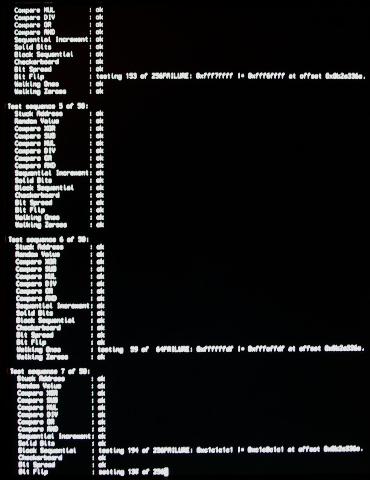
MemtestIn my last post, the Maxtor OneTouch drive was the prime suspect of the spontanious crashing of the Mac. Tonight the Mac mini crashed again, but this time without the Maxtor connected to it. So I set out to do a thourough memory test in single user mode, running memtest. And after a few iterations it was there: The dreaded memory failure. I guess I have to bring my mini back to the store to get replacement memory.Intermitting problems like this are terrible. They are hard to find, and you loose all trust in your computer, saving every 3 seconds, hoping you don’t loose anything. If the external drive was really to blame, I would seriously have doubted the implementation of the USB drivers, because the system crashes without warning, without logging or anything. A memory failure was actually the more plausible casue all the time, since the kernel just stops because the processor(s) reach a part of the memory where there was supposed to be code, but has become garbage. To be able to log, the processor has to execute code.

Apple, Hardware

Mac Mini Crash: cause located

Posted on 2006-05-04 By rolfje 1 Comment on Mac Mini Crash: cause located

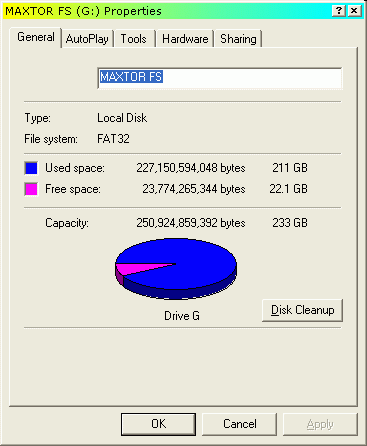
Windows screenshot showing Maxtor driveĀ statsToday I spent some more time using Google to find information on why my Mac suddenly crashed. I am now 99% that the cause of this all is my Maxtor OneTouch 250GB drive, which was formatted as one big Fat32 partition (screenshot). Although I connected it to a friend’s iMac for a short period without problems, and it has worked on my Mac mini for a while, I keep finding discussions about people with crashed Macs. I have not installed the Maxtor software, so that’s not the problem.I have disconnected the Maxtor drive last Saturday, and my Mac has been up and running ever since, without problems. I can almost rule out memory related issues, because when I startup Eclipse while running iMovie, iDVD, Thunderbird, Firefox, iTunes, Clutter and TextWrangler (yes all at the same time), the system keeps on running. In fact, it is still responding to user input as if I had only one of those programs running. Only very minimal swapping with 2GB memory, and when swapping, OS X is very efficient about it.

Now, my plans are as follows:

  1. Only connect the maxtor to a PC while it is still Fat32.
  2. Share the drive on the PC, and try to empty it as much as possible (move data to Mac and the fileserver)
  3. Run Rember in single user mode for a few iterations this weekend to rule out memory problems.
  4. Decide on a filesystem to use on the Maxtor, and reformat it.
  5. Re-connect the Maxtor OneTouch to the Mac and see if the gremlin is killed.

It is very likely that the drive is going to be formatted with the “Mac Os Extended” filesystem, but I’m not sure about journalling yet. The disadvantage of all this is that the drive can not be used to transfer files between a PC and a Mac.

Still it feels funny. Some people actually can create 100GB+ Fat32 partitions they can use on their Macs. I can read and write to the drive too, but at some point my Mac decides it has been enough and kills itself (probably after finding the windows crud šŸ˜‰

Sorry for the linking-frenzy, I had a lot of links I wanted to share with you.

Apple, Hardware

Dodenherdenking (2)

Posted on 2006-05-04 By rolfje No Comments on Dodenherdenking (2)

Vorig jaar heb ik mij aardig druk gemaakt over de abnormale manier waarop steeds meer mensen met dodenherdenking omgaan. Dit jaar was mijn ervaring gelukkig een stuk prettiger. Ik heb een klein stukje van de herdenking op de dam gezien, en dat was duidelijk een stuk beter dan vorig jaar. De taptoe werd foutloos en netjes geblazen, zelfs toen er (hoorbaar) iets omviel. Chapeau. Ook het inzetten van het volkslied waarbij mensen spontaan mee begonnen te zingen was erg goed om te horen.

Na de herdenking ben ik overgestapt op de uitzending vanaf de Grebbeberg. Minder (geen) toespraken, een stuk beter. Van mij mag het commentaar bij de uitzending ook nog weg, dat past beter bij het “geen toespraken” beleid en zorgt ook voor minder gewauwel “kijk er staan veel mensen”… Ja dat zie ik! Geluid uit, en probleem opgelost.

Nee (nogmaals) ik ben geen herdenkinsfanaat, maar ik vind dat mensen wel weer eens wat meer op hun gedrag, respect en elkaar mogen gaan letten. Bijvoorbeeld: Prachtig als je op je blog schrijft dat je je irriteert aan aggressieve weggebruikers, maar geef je ook het goede voorbeeld als je in je auto zit?

“A people that values its privileges above it’s principles soon loses both” – Dwight D. Eisenhower

Ok, genoeg gezeurd. Zennnn.

Uncategorized

Eclipse on Intel Macs

Posted on 2006-05-03 By rolfje No Comments on Eclipse on Intel Macs

Eclipse looks really nice on OS X. I can tell, I have it running on my mac Mini duo core. If you have problems getting it to start, and the logfile complains about linker errors, chances are you have the PPC version of the eclipse app file. To check this, Ctrl-click on the eclipse.app file. If it doesn’t say “(Universal)” somewhere next to “Type:”, then you need to download a newer version. Get the Eclipse 3.2 RC2 or higher, and make sure you download the “Mac OSX (Mac/Carbon)” version.

Read More “Eclipse on Intel Macs” »

Apple, Software

Great Read: The Graphing Calculator Story

Posted on 2006-04-29 By rolfje No Comments on Great Read: The Graphing Calculator Story

On one of my Google quests, I stumbled upon a great story about a few guys who got fired by Apple, but continued to sneak in and out of the building, finishing the software they had been working on. It is a great read, and I think it would make a nice adventure movie. It will probably will not be a box office hit, because the rest of the world does not know what programmers feel when being “in the zone”. It will probably end up in DVD shelves next to Office Space, one of my favourites.

I really enjoyed reading The Graphing Calculator Story, I hope you do too! Be sure to check out the screenshots šŸ™‚

Fun

Apple OS X crash when importing in iMovie

Posted on 2006-04-29 By rolfje No Comments on Apple OS X crash when importing in iMovie

Just now, I had a terrible experience with my new Mac Mini. It crashed on me, two times in a row. It did this while importing a movie from a Sony Handycam with iMovie. During the import, suddenly the screen goes blank, and the machine does a “hard boot”. I restarted iMovie, dragged the imported files from the trashcan and continued as normal. But now I’ve noticed that my Spotlight is no longer returning search results. Looking for “Terminal” resulted in amsolutely no results at all.

I checked the /var/log/system.log for errors, but I can only find the things logged during boot. I expected to find some kind of error just prior to the unscheduled boot, but there is none. The problem is so “hard” that the system doesn’t even get (or takes) the time to write information about it.

I tried to repair the Spotlight database with the tips found here, and found the solution. Open the Terminal (from Application/utilities) and do the following (requires root password, be carefull!):

rolf:/var/log rolf$ sudo mdutil -E /
Password:
/:
        Volume index removed.  Index will be rebuilt automatically.
rolf:/var/log rolf$ sudo mdutil -i off /Volumes/MAXTOR\ FS/
/Volumes/MAXTOR FS/:
        Indexing disabled for volume.
rolf:/var/log rolf$ sudo mdutil -E /Volumes/MAXTOR\ FS/
/Volumes/MAXTOR FS/:
        Volume index removed.

Yes, you noticed correctly, I turned off indexing on my Maxtor 250 USB disk and cleaned it’s database as well. Spotlight indexes USB disks, and I thought it best to focus on indexing the system disk first.

After doing this I waited for Spotlight to finish indexing. You can tell when it’s finished by clicking on the magnifying glas. It takes about 2-3 minutes to finish on my machine. After it finished I still had no results. To give the system a chance to clean up and restart I shut it down, and powered it back up. Problem solved! Spotlight works fine again (phew).

Oh and another tip: don’t minimize iMovie when importing a movie from your camera, it will stop importing, but leaves the tape running, letting you think it is still working fine.

It seems that although OS X is more stable than Windows, and can cope better with unexpected reboots (never lost a file during this whole adventure), it is not entirely bullet proof. If I find a way to avoid reboots in iMovie I’ll let you know. Smaller projects and more saving is the way to go for now.

Apple

Connecting with different users to 1 server (2)

Posted on 2006-04-28 By rolfje No Comments on Connecting with different users to 1 server (2)

This is a simple followup after my last post. Pim did also look into this, and made a script which doesn’t pop up finders by simply calling “mount”. There is only one minor glitch: the script pops up an error when the mount already exists. With my brilliant programming expertise, I quickly solved that:

try
	mount volume "cifs://KAGE/iTunes" as user name "iTunes" 
                                          with password "yourpasswordhere"
	mount volume "cifs://KAGE/incomming" as user name "Guest"
	mount volume "cifs://KAGE/foto" as user name "Guest"
on error errText number errNum
	(* Not the nice way, simply ignore errors. If the mount did
	   not work, the user needs to see what is going on. How?
	   Use Finder to mount, and it will give you the error *)
end try

This script will try to mount the drives, ignoring errors. Replace the servernames, usernames and passwords with your own. What you can do is run the script at logon, or every minute in a cron job. I checked /var/log/system.log, but the script does not generate errors there.

At the rate we’re going, maybe we’ll even solve the “re-mount drives on return from sleep” problem. Let’s see if we can find a wakeup event on which we can run the script.

Apple, Software

Connecting with different users to 1 server

Posted on 2006-04-27 By rolfje No Comments on Connecting with different users to 1 server

With my Mac mini in a Windows LAN, I have the following problem:

  1. I can add my (cifs windows) network shares to my login script (Preferences -> Accounts -> Login), but when the mac wakes up from sleep, they are gone.
  2. When I want to connect to 2 shares on the same server, but one with a different account than the other, it doesn’t work. On login, the system chooses one of the accounts and uses it to connect to both network shares.

I think both problems are terrible, and particularly the way you connect to a network share in Finder using a password is confusing to say the least. Searching the web reveals hundreds of posts of people having the same problems. One wonders why apple didn’t solve this already.

I made a simple workaround for this problem by copy/pasting some script from several websites into the script editor (sorry guys, I’m lazy). I then saved it both as application and as source. I use the script to mount the drives at logon, and re-mount them when the Mac wakes from sleep mode. Until I come up with a better idea, or somebody can point to a nicer “Apple way” solution, or Apple fixes this dreadful problem in OS X, here is my script:

tell application "Finder"
	open location "cifs://WORKGROUP;iTunes@KAGE/iTunes"
	open location "cifs://WORKGROUP;Guest@KAGE/incomming"
end tell

When running a script like this for the first time, the system asks you the passwords. Type them in and save them in your keyring. The next time they won’t be asked, and you have no readable passwords in your script. Nice. The downside of this script is that it opens a ton of finder windows. I have nosed around in Automator but can not find a way to close them automatically. I also tried to record a script, but that gave me an even more “unusable” script.

I hope this helps you too. If you think this can be done in a nicer way (without too much scripting) please let me know.

Update: Seems I was to quick about the keyring app. I did need to add passwords to the script (add “:password” after the userid without the quotes). Stupid machine does not understand what I want.

Apple, Software

Flip4Mac 2.0.2 does not install on Intel Macs

Posted on 2006-04-24 By rolfje No Comments on Flip4Mac 2.0.2 does not install on Intel Macs

Bummer, I was hoping to be able to open those wmv files I get mailed in the Quicktime window. Although OS X claims to be supporting Flip4Mac since 10.4.5 (I have 10.4.6), the Flip4Mac installer exits with a message about not being able to install on Intel based hardware.I guess I’ll have to live with -gasp- Windows Media Player 9 for OS X for now. I tried to install it, but it requires mee to enable the Microsoft Office testdrive kit, which I am definetely NOT planning on doing, wmv files are not worth those troubles. I am hoping on a universal binary Flip4Mac soon…

Funny thing is, that the Windows Media player for OS X is actually only 7 MB in size. I seem to recall that Media Player 10 for Windows XP took quote some time downloading, and ate nearly all of the free space on my harddisk, which I was really pissed about. But then again, since they require me to enable the Microsoft Office testdrive, they have probably allready sneaked part of the player into the OS X distribution, the bastards.

Comment from Antonio on how to solve this: You can get Flip4Mac to work through Rosetta, but Telestream is a couple weeks away from releasing a public Universal beta version. Check this blog for some details and other info bits: http://flip4mac.blogspot.com/

My response: Great, just used the tip on blogspot, and it worked! I can now view wmv files nicely. Thanks for the tip!

Apple, Software

Getting iChat to work with Googletalk

Posted on 2006-04-23 By rolfje No Comments on Getting iChat to work with Googletalk

This is probably the 1001st post about this subject, but I can’t help thinking that some people actually give up on this. It is a simple protocol, simple program and should be simple to get working. I spent a few hours (!) before I finaly found the solution. I searched the internet but this answer never seems to be given on forums. I’ll try to be complete, so here it goes:

Configure iChat as described by Google. If you still can not connect, there is a good chance you have started the firewall on your mac, and it is blocking iChat. Open the system preferences, and in the “Internet and network” section select “Share”. You will notice a firewall tab in the middle. Select it, and make sure there is a thickmark next to “iChat Bonjour”, like in this screenshot:

iChatĀ settings

(Sorry for the Dutch layout, I’m sure you’ll find it with this pointer.)
This action solved my iChat connection problem. I also installed Adium, which also had connection problems. The firewall setting solved the Adium problems aswell.

I’m not sure which chat client to choose. iChat is more integrated into OSX, and imported my google contacts without a problem. Adium did not import any contacts. I’m sticking to iChat for now, hoping that the integration with the rest of the system will give me some pleasant surprises.

Oh and yes, you’ve noticed correctly, I’ve bought a Mac. The desktop PC at home crashed one time too many.

Apple

Posts navigation

Previous 1 … 32 33 34 … 37 Next
         

Recent Comments

  • rolfje on European alternatives to AWS/Azure/GoogleCloud
  • rolfje on Are you de-skilling?
  • rolfje on Are you de-skilling?
  • rolfje on Exit WordPress
  • Guus on Exit WordPress

Tags

Apple backup design DIY DRM eclipse environment fix Fun Garmin gmail google hacking hamradio Hardware helicopter iphone ipod iTunes Java Kawasaki Keynote linux modelling motorcycle music news opinion oracle osx photo photography programming repair review security Software technology Time Machine Ubuntu usability Utilities vacation windows Workshop

Categories

  • Apple (107)
  • Divorce (1)
  • Electronics (4)
  • Fun (57)
  • Games (7)
  • Hardware (73)
  • Microsoft (18)
  • Racing (16)
  • Software (143)
  • Uncategorized (68)
  • Workshop (22)

Archives

Brought to you without adds, banners, cookies or tracking. This one is on me. Yes, life can be this good. Pay it forward.

Copyright © 2026 www.rolfje.com.

Powered by PressBook WordPress theme