Skip to content

www.rolfje.com

Author: rolfje

Brilliant Fluids

Posted on 2005-10-31 By rolfje No Comments on Brilliant Fluids

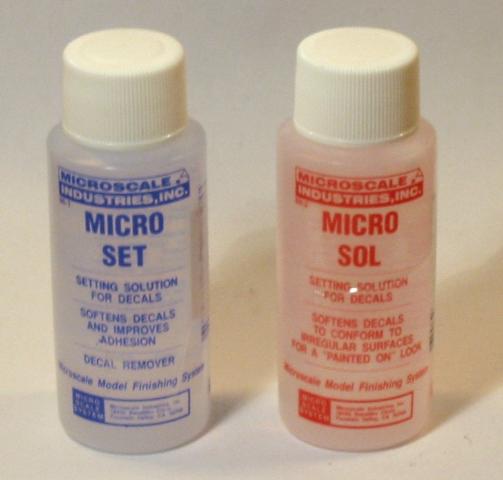
Patience has paid off! In stead of stripping the front fender from the terrible italeri decals, I left it as is, and started searching the web for solutions. I read some brilliant tips on the forms at www.modelbrouwes.nl, and went to the local model shop and bought some Microscale SET and SOL decal solutions.

Actually, de bottle labled “SOL” proved to be the most useful. After you applied the decal, and it is all dry (like my carbon fender struts), you gently apply the SOL fluid to the decal with a soft brush. As you may have guessed, SOL stands for “solution” and that’s what it does, it dissolves the decal slightly. The decal becomes so soft you can push and stretch it with the soft brush. Don’t overdo it, if the decal won’t go any further just let it dry, and try again tommorow. Sometimes it takes 2 to 3 tries.

The funny thing is that when the SOL fluid is applied, your decal may start to wrinkle. Ignore this. Just let it dry for a few hours (don’t touch it!) and it will straighten out. Really great stuf!

The SET fluid smells like vinigar, and you are supposed to apply it to the model before you put the decal on. I have tried it, but I haven’t seen the benefits of it yet. Maybe the SET fluid de-greases the surface a bit, but since I keep the surfaces clean anyway, it won’t do much for me I guess. I have a lot more twisty and lumpy carbon parts to do, so maybe I’ll get back at this…

Workshop

Exhausts Airbrushed

Posted on 2005-10-25 By rolfje No Comments on Exhausts Airbrushed

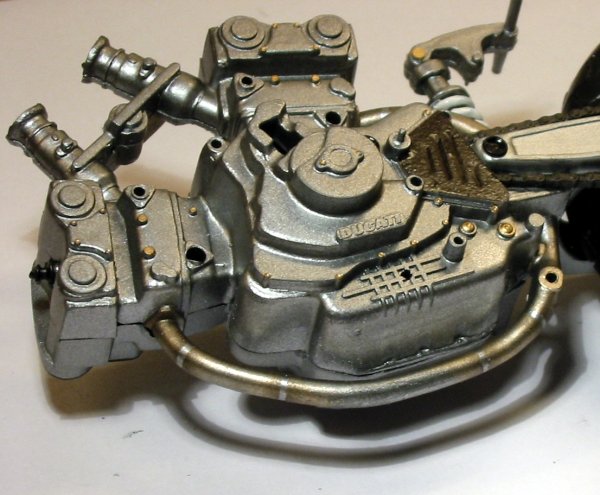
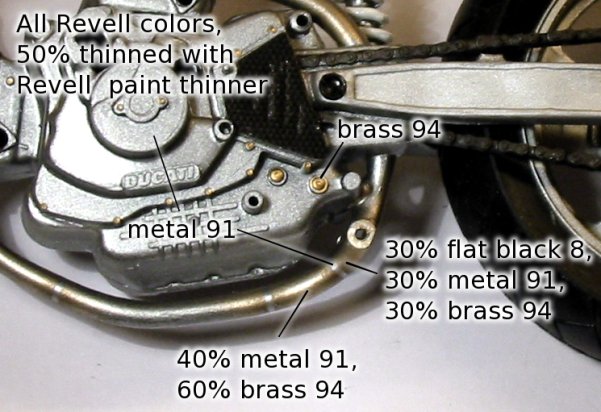
After a lot of masking, lot of paint-mixing, and very little airbrushing, this is the result of my airbrush adventure to make the exhaust pipes look more realistic. I smuggled a bit, because normally exhausts are welded out of several bended pipes, to get the desired curve. The welds are allways on a spot where two bends meet. In this case, the welds are on random positions, and because I don’t have a very acurate airbrush (rigid needle), they are seperated a bit more than normally. By doing it like this I can make the 3 gradients I wanted from metal to dark bronze-like oxidated metal.

It may be not competely realistic, but it sure beats my normal pencil-only paintjobs! For the observant reader: Yes, that’s another yucki Italeri decal on the engine side cover which is supposed to look like a carbon part with slots in it. The thick Italery decal can not follow the detail of the slots. I still haven’t got the micro set fluid which could solve this (from hear-say). More on that later this week I guess, when I have time to stop by the local modelling shop to see if they have it in store.

I also notice that it seems to be harder to get the larger models more realistic. Small models are easier because at some point, you simply can’t add more detail, and it will look good. I built my first ducati in less time, without an airbrush, and it looks quite nice. I think I’ll stick with the smaller models from now on. Shorter build time, takes up less storage space, are (very) cheap and fun to do.

Workshop

Terrible Italeri Decals

Posted on 2005-10-19 By rolfje 2 Comments on Terrible Italeri Decals

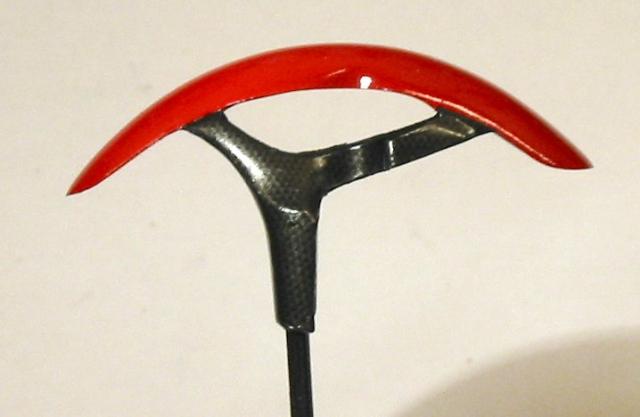
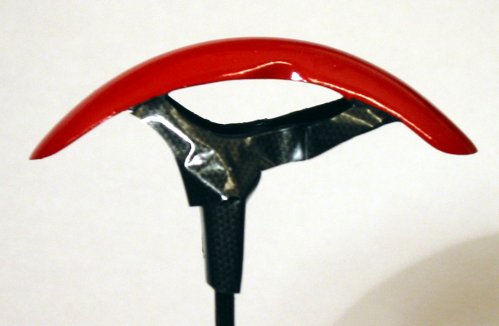
So here I am, building my Ducati Monster S4 Fogerty 1:9 scale model, and I discover that the decals that are contained in the kit are pretty worthless. After 30 minutes of fiddling with the decal, the results of the carbon fender supports is terrible. As you can see on the left. Please note that the fender is about 5 centimeters long, so the decal does not have to fold in tight bends to cover the fender support. Right now I am leaving it at this, and wil try to get my hands on some Microscale Micro Set to see if I can make the decal soft enough to do what I want. If not, I’ll just paint all the carbon parts with semi-glos black. Maybe it will not be realistic, but at least it looks better than the strangely wrinkled carbon stickers

Airbrushing is becomming easier every day. The gloss paints are really comming out right, despite some small dust particles which allways show up when you don’t need them. I have no plans on polishing the paint as some perfectionists do, it looks way better than using a brush to smear paint into the detailing of the parts. I’ll just place this model next to a hand-painted one for the contrast ;-).

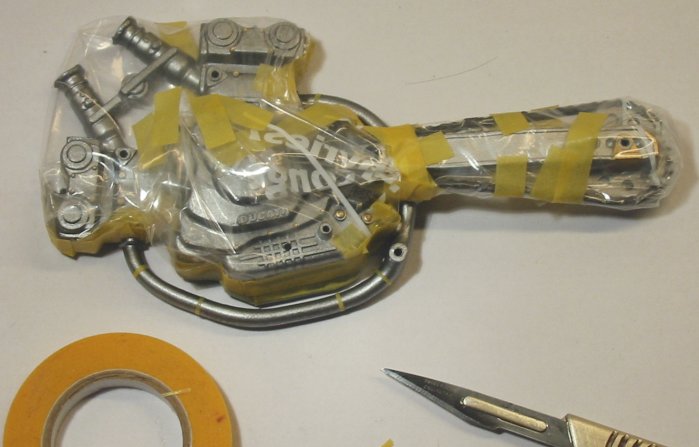
I spent the rest of the evening masking up the engine parts with masking tape to be able to make the exhaust pipes a slightly darker color. I will try to make the pipes darker at the cilinders, slightly changing to a lighter metal color on the colder parts. Maybe I’ll even manage to get the welding joints looking realistic, who knows. It’s a lot of work, masking the engine, exhaust pipes and welding joints in the pipes took me more than 2 hours. I’ll paint them in probably 4 different colors, so it will take some time before the engine parts are finished.

Uncategorized

Ducati Desmodesi Supersport

Posted on 2005-10-16 By rolfje 1 Comment on Ducati Desmodesi Supersport

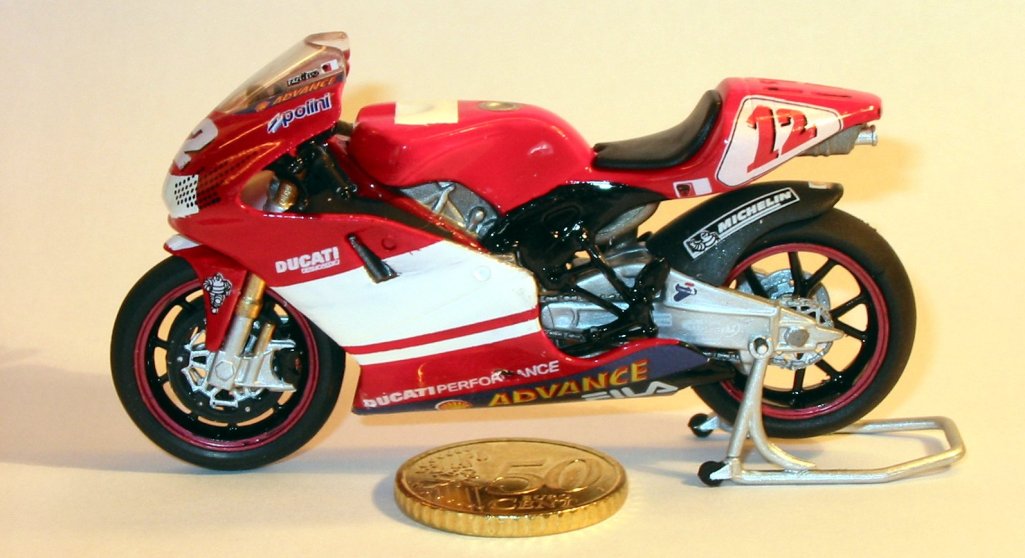
A few weeks ago I completed a small model of a Ducati race bike. I did do some modelling some years ago, but it gradualy lost my interest. Then, a friend of mine came along and brought this small model of a motobike because I just got my motorbike driverslicense. He didn’t expect I’d really build it, but I did, and I think the result is pretty decent, considering it’s size.

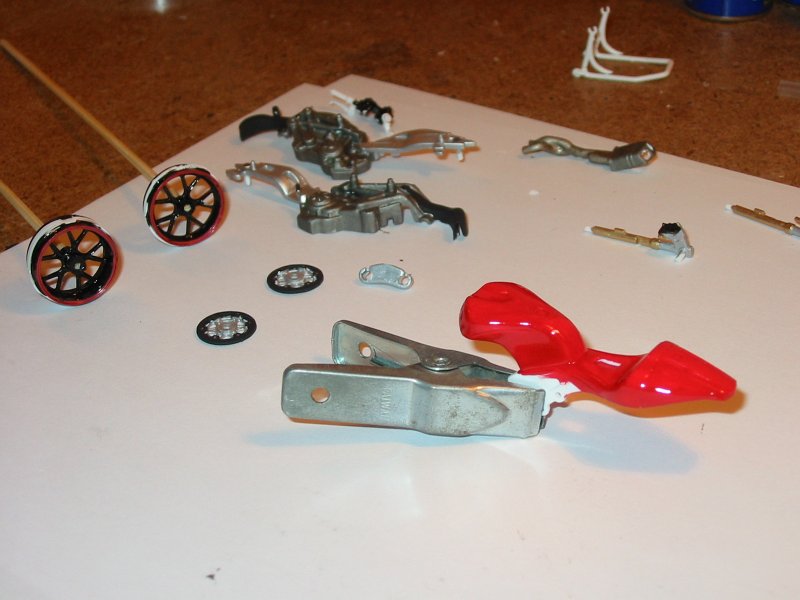
And yes, it was really a model. Here you can see some parts during the build.

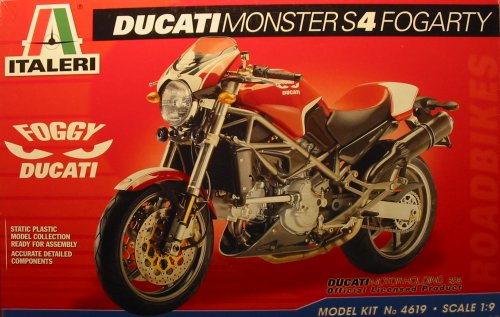
I really got the taste building bikes, so I bought a 1:9 scale Italeri model of a Ducati Monster S4 Fogerty. I will upload images during the build in the next few days/weeks. I also found my old airbrush, and made an adapter to connect it to my compressor. The compressor has a 24 liters airtank, and a pressure reducing device so I can make the pressure going into the brush between 1 and 8 bar. It really works great, and I have allready painted the frame, the tank and the engine of the Ducati Monster with it. More pictures to come!

Here is a picture of the adapter. On the right, there is a large (1/4″) connector to connect the compressor airhose to. On the left, there is a small connector to which a Badger or Revell airhose can be connected which leads to the airbrush. I got the small connector by destroying the Badger aircan connector.

Uncategorized

Where’s North again?

Posted on 2005-10-03 By rolfje 1 Comment on Where’s North again?

Lately, I’ve been collecting race circuit locations using Google Earth. It’s really nice to see the sometimes very detailed satelite images of race circuits. You can actually see the seperate kerbstone blocks of silverstone, and see how many cars there were parked at the time the picture was taken. You should try it.

What really started to catch my interest is the fact that the maps of circuits as they are used in logo’s or (worse) “how to get there”-maps are almost never of the “north pointing up” type. An example:
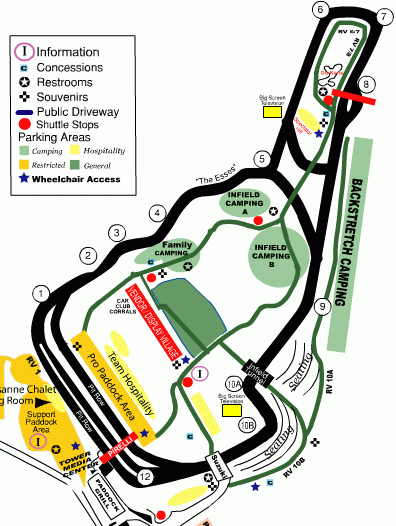
The circuit “Road America”, which is located a few miles north-east of Atlanta, Georgia, has a web-site which shows you a detailed map of the circuit, as well as pointers to the nearest highways. I have grabbed an image (because they only have these stupid noise making flash movie thingied nobody is interersted in after the second visit). It looks like this:

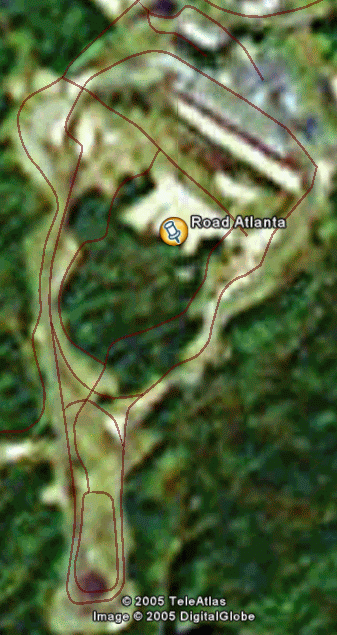
So, in my quest to find this circuit using Google Earth, I found the circuit to be along the 53, halfway from the I85 to the I985, just like the directions stated. But, the circuit seemed to be “turned around:

I have noticed this with a lot of ciruits. I understand the need of turning and simplifying the circuit to make a nice logo, but when the circuit is depicted next to driving directions, I would make the map “north side up” so nobody gets confused. In the first image, the I85 apears to be west of the circuit, while it is actually east of the circuit.

Google Earth location of Road America (so you can check for yourselves):

<?xml version=”1.0″ encoding=”UTF-8″?>
<kml xmlns=”http://earth.google.com/kml/2.0″>
<Document>
<Style id=”khStyle662″>
<IconStyle id=”khIconStyle664″>
<Icon>
<href>root://icons/palette-3.png</href>
<x>224</x>
<w>32</w>
<h>32</h>
</Icon>
</IconStyle>
</Style>
<Placemark>
<name>Road Atlanta</name>
<LookAt>
<longitude>-83.81483349103033</longitude>
<latitude>34.14598906888146</latitude>
<range>2835.974155514713</range>
<tilt>-8.888997363646108e-012</tilt>
<heading>0.3186400317363279</heading>
</LookAt>
<styleUrl>#khStyle662</styleUrl>
<Point>
<coordinates>-83.81483349103033,34.14598906888146,0</coordinates>
</Point>
</Placemark>
</Document>
</kml>

Racing

Ibatis and Timestamps (2)

Posted on 2005-07-04 By rolfje No Comments on Ibatis and Timestamps (2)

People who have read my last post are now probably removing the Date classes from their beans, replacing the code with things as new Long(new Date.getTime()) and such. This is also what I started doing, until a collegue of mine pointed out that the TypeHandler I wrote last saturday could also do the trick. This would mean my beans could still contain clean Dates. I was so close, and failed to realize that I (or ibatis) had that power.

So I set out to do this and it works wonderfully. What I did was the following. I changes all postgres timestamp fields to bigints, like you read yesterday. I left my beans unchanged, containing java.util.Date objects for representing dates. So now all we need to do is write a typehandler which converts the date to a long and back, so Postgress and the buggy JDBC driver don’t realize it’s actually a Date.

To do this I wrote the following TypeHandler:

public class DateTypeHandler
implements TypeHandlerCallback {

public void setParameter(ParameterSetter setter,
Object parameter)
throws SQLException {
if (parameter == null) {
setter.setNull(Types.BIGINT);
} else {
Date datetime = (Date) parameter;
setter.setLong(datetime.getTime());
}
}

public Object getResult(ResultGetter getter)
throws SQLException {
long millis = getter.getLong();
if (getter.wasNull()) {
return null;
}
return new Date(millis);
}

public Object valueOf(String s) {
return s;
}
}

Now, all we need to do is tell ibatis to use this typehandler whenever we try to insert or retreive a java.util.Date. We do this by adding the following line to the ibatis SqlMapConfig.xml file, just after the typealias definitions:

<typeHandler javaType="java.util.Date"
callback="com.bestlaps.database.typehandlers.DateTypeHandler"/>

After doing this, you can cary on doing things as normal. Beans can contain java.util.Date, and ibatis happily inserts and retreives them in postgres bigint columns without any timezone conversion. Please note that timezones are not stored at all here, so when you retreive a Date from the database, the java.util.Date object will have your local JVM’s devault timesone offset. You can happily ignore this, especially if you’re not going to do any calculations with it.

The beauty of this solution is, that when there is a solution for the silly timezone conversion problem/bug, we can simply convert all database fields to timestamps, and remove the typehandler reference from the SqlMapConfig.xml file, and you’re all set without changing a single line of code.

Thanks Joris!

Software

Ibatis and Timestamps

Posted on 2005-07-01 By rolfje 1 Comment on Ibatis and Timestamps

I am using Ibatis and PostgreSQL for this great project, www.bestlaps.com. However, we’ve recently ran into a strange problem where we store a java.util.Date into a postgress TIMEZONE column, which works fine. However, when you want to retreive it, Ibatis returns a “StringIndexOutofBoundsException” at position 23. For some reason, the result returned by Postgres can not be converted back into a java.util.Date.

I’ve tried really hard to circumvent this problem with custom setter methods (parsing the results myself), and using jodatime (a great java date and time replacement library). The fix is as simple as it is strange: Make Ibatis convert the timestamp into a java.sql.Date, without changing your code.

So: You have your normal bean, in which you use java.util.Date. Then, make your Ibatis sqlMap as usual, but for the timestamp column you put the following in the resultmap: javaType=”java.sql.Date”.

Strange, but it works for now. Maybe more info on this later.

UPDATE: Okay, after spending the whole weekend with this problem I discovered that the trick I just described does noet work. java.sql.Date has no time component, so when you retreive it, your java.util.Date in the bean will have a 00:00 time. So I had to search a bit further.

When querying with SquirrelSQL, I can insert and retreive a timestamp to and from Postgress without it being changed. So it seems that it is no Postgress bug. When I am using Ibatis to insert a java.util.Date into Postgress, it gets “timezone corrected”, although I specifically told Postgress to store timestamps without timezones.

The time gets corrected by 2 hours. This seems to come from the util.Date class, which seems to have a default offset of -120 minutes, although I did not set that, and did not request any timezone to be set.

I tried to make my own typeHandler for Ibatis, where I could convert the java.util.Date to a java.sql.TimeStamp, and give it directly to the PreparedStatement. But even that did not help. I am guessing the bug is in the Postgress JDBC driver, although that conflicts with the fact that SquirelSQL (which is als a Java/JDBC program) can do it.

THE FIX: After more than 16 hours (!) of research I decided I would go for the workaround. We are behind schedule allready for the www.bestlaps.com project, so I needed a quick fix. The way to go was dissapointingly simple: Convert Date’s to Longs (with getTime()) and store the Longs in the database as number. This way ibatis and postgress don’t know that it’s a time. Pay attention to the fact that you need a postgress BIGINT to store the large number of milliseconds since the epoch.

Final thoughts: It seems that people who do not know how to handle timezones have built code to handle timezones. For Java, Postgres, Ibatis, or somewhere around that neighbourhood. Oh well, we knew that Java doesn’t have a great Date system. A promising solution I found (but not used yet) is JodaTime.

I really hope the bug gets fixed soon so I can have proper dates in the database when we go live. For now, Longs work (and will probably stay in to the end of time).

Software

Dodenherdenking

Posted on 2005-05-04 By rolfje No Comments on Dodenherdenking

Ben ik nou gek, of word dodenherdenking tegenwoordig een beetje “afgeraffeld”? Iedere Nederlander zou toch moeten weten hoe belangrijk het herdenken van de tweede wereld oorlog is (en zou moeten blijven). Toch lijkt het erop dat er steeds meer gemorreld wordt aan de gedachte, en de uitvoering van de herdenking zelf.

Read More “Dodenherdenking” »

Uncategorized

Drag Racing Season 2005 Calendar

Posted on 2004-12-11 By rolfje No Comments on Drag Racing Season 2005 Calendar

As usual at the end of august, in 2005 there will be another edition of the Nitro OlympX. Aside from being a great entertainment-for-the-family weekend, it is also round 5 of the FIM/UEM EUROPEAN CHAMPIONSHIP TOUR:

Round Venue Date
1 Santa Pod, England
(Main Event)
May 27-30
2 Alastaro, Finland
(FHRA Nitro Nationals)
July 1-3
3 Mantorp Park, Sweden
(Veidec Nitro Festival)
July 28-31
4 Gardermoen, Norway
(Drag Challenge)
August 5-7
5 Hockenheim, Germany
(NitrOlympX)
August 19-21
6 Santa Pod, England
(European Finals)
September 8-11
– Bahrain
(Dragracing Festival)
November 9-11

Please note that the dates may be subject to change.

More information can be found at Monique’s Top Fuel Drag Racing Site (it’s also the place where I got the schedule from :-), thanks Monique!.

Have a great 2005 season and may the best bike win! (like it did last year 😛 )

Racing

Milling aluminum housing

Posted on 2004-11-14 By rolfje No Comments on Milling aluminum housing

Today I found the first good use for the milling machine. I had this cast aluminum housing for an electronics project, with ridges on the inside. I made a hole for a connector in it, but I never got the nut on the inside flat to the surface because of the ridges on the inside of the housing. I decided to use the mill to flatten the surface on the inside of the housing. The housing did not fit in the clamp, so I had to find a way to get it attached to the bed of the mill in a different way. I took a piece of wood, drilled two holes in it and bolted that to the bed of the mill. Then, I used long plywood screws and another piece of wood to hold the housing. In the picture on the right you can see this construction. I used a test indicator to align the house to the X-axis of the bed.

Since I only needed a plane large enough to place a ring and nut on, I roughly adjusted the 6mm mill to just not touch the bottom of the housing. I milled down to the point where the ridges were not visible. The image on the left is the result of the work. The mill is a very nice tool to adjust ready-made electronics housing to your likings.

Hardware, Racing, Workshop

Posts navigation

Previous 1 … 34 35 36 Next
         

Recent Comments

  • rolfje on Exit WordPress
  • rolfje on Methode Buijs uitgelegd
  • LinkedIn is at Peak Enshittifaction – Will Chatham's Blog on Linked-In not really Opt-in?
  • Hans j on 1N4148 diode as RF switch
  • Roaming Rhonda on DLNA on OSX, done right

Tags

Apple backup design DIY DRM eclipse environment fix Fun gmail google hacking hamradio Hardware helicopter iphone ipod iTunes Java Keynote linux maven modelling music news opinion oracle osx photo photography programming repair review security Software T-Mobile technology Time Machine Twitter Ubuntu usability Utilities vacation windows Workshop

Categories

  • Apple (105)
  • Divorce (1)
  • Electronics (3)
  • Fun (57)
  • Games (7)
  • Hardware (72)
  • Microsoft (18)
  • Racing (14)
  • Software (136)
  • Uncategorized (68)
  • Workshop (20)

Archives

Brought to you without adds, banners, cookies or tracking. This one is on me. Yes, life can be this good. Pay it forward.

Copyright © 2025 www.rolfje.com.

Powered by PressBook WordPress theme