Today I found an article about Norway suing Apple because music bought in the iTunes store could not be played on a non-iPod music player. If Apple looses this legal attack, it would result in an even stranger digital rights management situation than we already have.
Lost Oracle SYS and SYSTEM password?
If your administration is as good as anybodies, you are bound to loose the not-so-frequently used password for the SYS and SYSTEM users of oracle. Here are a few ways I found to re-set those passwords:
Method 1: SQLPLUS (Tested on AIX Oracle 9.2.0.1.0)
Log into the database server as a user belonging to ‘dba’ [unix ] or ‘ora_dba’ [windows ] group , typically ‘oracle’, or an administrator on your windos machine. You are able to log into Oracle as SYS user, and change the SYSTEM password by doing the following:
$ sqlplus "/ as sysdba"
SQL*Plus: Release 9.2.0.1.0 - Production on Mon Apr 5 15:32:09 2004

Copyright (c) 1982, 2002, Oracle Corporation.  All rights reserved.

Connected to:
Oracle9i Enterprise Edition Release 9.2.0.1.0 - Production
With the OLAP and Oracle Data Mining options
JServer Release 9.2.0.1.0 - Production

SQL> show user

USER is "SYS"

SQL> passw system
Changing password for system
New password:
Retype new password:
Password changed
SQL> quit
Next, we need to change the password of SYS:
$ sqlplus "/ as system"
SQL*Plus: Release 9.2.0.1.0 - Production on Mon Apr 5 15:36:45 2004

Copyright (c) 1982, 2002, Oracle Corporation.  All rights reserved.

SP2-0306: Invalid option.
Usage: CONN[ECT] [logon] [AS {SYSDBA|SYSOPER}]
where <logon>  ::= <username>[/<password>][@<connect_string>] | /
Enter user-name: system
Enter password:

Connected to:
Oracle9i Enterprise Edition Release 9.2.0.1.0 - Production
With the OLAP and Oracle Data Mining options
JServer Release 9.2.0.1.0 - Production

SQL> passw sys
Changing password for sys
New password:
Retype new password:
Password changed
SQL> quit
You should now be able to log on the SYS and SYSTEM users, with the passwords you just typed in.
Method 2: Creating pwd file (Tested on Windows Oracle 8.1.7)
- Stop the Oracle service of the instance you want to change the passwords of.
- Find the PWD###.ora file for this instance, this is usuallly located atC:\oracle\ora81\database\, where ### is the SID of your database.
- rename the PWD###.ora file to PWD###.ora.bak for obvious safety reasons.
- Create a new pwd file by issuing the command:
orapwd file=C:\oracle\ora81\database\PWD###.ora password=XXXXX
where ### is the SID and XXXXX is the password you would like to use for the SYS and INTERNAL accounts. - Start the Oracle service for the instance you just fixed. You should be able to get in with the SYS user and change other passwords from there.
Monokai
I just checked out the new Dutch CC CD/DVD released under the Creative Commons license. While I was there I found a great piece of music done by Monokai. It’s kind of old C64 game like music, you like it or hate it. I went to check out Monokai’s website and I’ve spent a good 30 minutes playing with it.
The website is filled with music, photo’s and electronic games, and is fun to play with. Go check it out! Nice quality!
See the iPhone Demo
Want to see how the iPhone works? Check out the iPone demo page at apple.com/iphone
Apple reinvents phone, ipod and userinterface… in 1 go
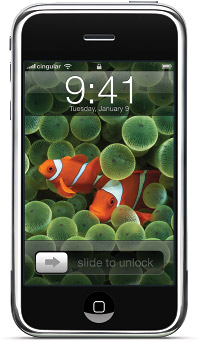 I have been watching the Macworld 2007 keynote address for the last 2 hours and all I can say is:…
Jup, nothing. I am absolutely amazed by the way Apple has not only reinvented the phone (look ma, no keys!) but also the ipod (look ma, coverflow!), and maybe the most overlooked, but they reinvented the mouse!!!
A couple of months ago, I was amazed at this new userinterface Jeff Han presented . It was touchscreen based, and very intuitive. He amazed the crowds with it. At the time me and my collegues guessed that he must have had several computers working in parallel to be able to facilitate this. Now, Apple actually integrated it into the phone!
If you think a phone without keys sucks, and you think your blackberry is a great device, please take a look at the keynote presentation, I think you will want one of these. If you are too busy to sit for 2 hours watching this amazing device, or even too busy to watch the shortened version (on the same page, as the keynote, above), I’ll list some of the highlights:
- Large (and I mean LARGE) touch sensitive display all over the front of the phone
- ipod functionality, syncing not only your music, but also your photos, movies and contacts automagically between your Mac and your phone
- Runs Mac OSX, Apples operating system shipped with all macs. (Yes REALLY runs it)
- Full, 100% normal internet browsing using a new version of Safari (told you it runs OSX, didn’t I?)
- Full Google maps integration (not a crippled mobile phone version), enabeling you to view maps and satelite images on your phone, and integrates with your phonebook and other applications. Lookup where an address is, or search for the nearest Starbucks and directly phone a store from within the Google map (demo in keynote).
- Full rich text IMAP and POP3 email client with very easy to use onscreen keyboard with error correction
- Tilt sensor to enable to view anything in landscape mode by just holding your phone horizontally, providing widescreen movie viewing!
- Gesture based user interface, allowing you to navigate through the phone and zoom in and out on practically anything
- Quad band phone using GSM + EDGE standard. Currently only shipping with Cingular and AT&T and a free Yahoo! imap account. Technically possible to use in Europe using any GSM network provider, but I don’t know how the Cingular contract looks for Europe.
- Built in WIFI and bluetooth technology to connect to the internet or any network, and a bluetooth headset, and it does that seemlesly
- Random access voicemail (tap on the voicemail you want to hear)
- Priced at $499 for a 4GB model, and $599 for an 8 GB model, available in June in US, end of 2007 in Europe, and 2008 in Japan.
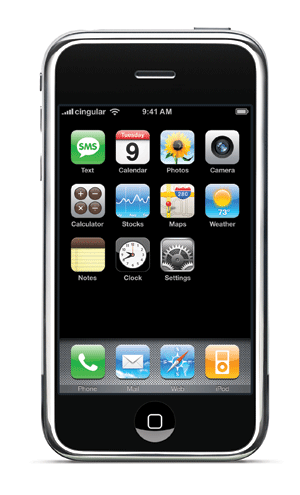 My list could go on and on, but these are probably the highlights you were looking for. I’ve seen Steve using the iPhone, and the userinterface is a dream. If you own a Microsoft mouse with the “heavy scrollwheel” you will know what I mean when the iPhone scrolls through the lists by giving it a swing. Amazing to look at. The Core animation of OSX is in the phone, so everything tilts, swoops and zooms like on your desktop and it is really, really nice too look at.
My guess is that by doing this and patenting it, the next step Apple will take is reinvent the desktop userinterface. Have your screen built into your desk, throw your keyboard away and touch the screen! It has been done before, but after you’ve seen the keynote you will agree with me that Apple can do it right this time.
It has been quite some time since I have been amazed by a product like this, although it will be a while before I own one because I’m afraid it will get stolen because of it’s good looks. I’m afraid it will even push the iPod out of the market a little, and Zune will be dead and gone when the iPhone hits the market…
Go and see the Macworld 2007 keynote address, and see his Steveness improvise when his “Clicker’s not working” just before he announces “Apple Computer Inc” is now going to be called just “Apple Inc”. Maybe Apple should ship this keynote on DVD. Seriously. Even if the only reason is seeing John Mayer perform “Gravity” live and unplugged at the end.
I’ll hold on to my Google and Apple shares for a while I guess…
Waar was Miriam?
In het laatste verslag van de Dakar rally op RTL7 was in de uitslag van de motoren Miriam Pol (warning audio ahead) van de lijst gevallen. Er werd ook geen woord aan gewijd in het verslag. Voor de mensen die bang zijn dat ze uit de race is: Nee dat is ze niet, Miriam staat 97e op dit moment en heeft zo te zien ook een sponsor gevonden in JB Trading als ik de laatste beelden van haar shirt en de banners op de site mag geloven. Geen vraagtekens meer op de motor (en bankrekening).
Uitslagen voor de motorfietsen (de enige echte Dakar helden in mijn ogen) kun je vinden op www.dakar.com/2007/DAK/LIVE/us/200/classement/CGM.html.
Een ander intressant team om te volgen is Tim Coronel en vriendin Gaby Uljee. De ultieme relatietest, je vriendin kaart laten lezen in een woestijn, tijdens een race naar Dakar. Als je InternetExplorer gebruikt, kun je ze volgen op www.coroneldakar.com. Helaas hebben de sitebouwers van dakarsport geen Firefox op hun PC, want ik kan de site hier niet lezen.
My photo’s on your wall
 Hi, I just discovered oypo.nl, an online service for photographers to sell prints of their photographs. It’s a simple concept, where a photographer uploads images, and the website sells prints of these images to anybody who orders them. Part of the commision is going back to the photographer, and to some extent the photographer can decide how expensive his photograps are to the public.Because opening an account is free, and because I think my photo’s are WAY better than most of the material on oypo.nl, I decided to open an account just for fun. If you like to buy my photographs, take a look at them at
The resolution of he shots should give good to very good results on near poster format, and I try to keep the choice simple by only uploading the interesting ones. Have fun!
Nice Mac Tools
As a Mac user, I have absolutely no problem editting, moving and viewing large video, audio and image files. There was one thing I missed though, and that is a tool which is able to quickly view a large JPG (like OSX’s own preview) but then skip to the next image in the directory when selecting “next”. Today I have found just that tool, and it is a dream to work with. It called Xee (not to be confused with the rather lame Xsee).
Xee loads jpg’s blindingly fast from my remote fileserver. Then, using just the keyboard, I can easily zoom in, out, skip to the next or previous file in the directory, fit the image to screen, etc. After testing about 20 or so image viewers, It is absolutely the best image viewer I have found.
During the search for Xee, I also encountered the OSX Power Tools page, which is a list of very handy utilities for the Mac, and from what I can see all of them are free to use (check license to be sure).
X for Vista…
Hi, do you also think Windows Vista gets too much credit for stealing Apple’s Mac OSX, a.k.a. Tiger? Here’s a funny little movie on nytimes.com with proof that Windows is “not” an OSX ripoff. Very funny.
Airport Express works great… Until you want WPA2(AES)
I recieved my Airport Express last tuesday and had it installed as a wireless audio connection for my stereo in a couple of minutes as follows:
- Plug the Airport Express in a wall outlet.
- (Temporarily) connect it to the network using an UTP cable
- Run the Airport Administration utility (forget the wizzard, it will not allow you to setup the airport as a client).
- Setup the Airport Express to connect to your existing network (which was WEP encrypted at that time)
- Unplug the Airport Express, take it to the living room and plug it into an outlet, and connect it to the stereo (look ma, no wires!)
- Select the airtunes to be used as speaker device in iTunes and you’re all set
Read More “Airport Express works great… Until you want WPA2(AES)” »