Skip to content

www.rolfje.com

Mac Drama Day

Posted on 2006-05-20 By rolfje 1 Comment on Mac Drama Day

Mac Support guy on the job in UitgeestSo, finally the first post on my blog since 2 weeks of Mac absence. I really got annoyed by the repair guys at Mac support the past few days. I started calling them daily, and discovered if you don’t, your repair just simply will sit there on a shelf. For some strange reason, they ordered a superdrive for my Mini, the guy on the phone promised me he would install it on friday as soon as he got it. So I called in friday afternoon to see how things are going, and guess what? The drive was in, but not in my Mac! They promised me they would install it and call back. You guessed it: they didn’t.This mornig I decided to drive over there, because they essentially promised it would be ready yesterday. Although nobody called me, apperantly the repair was done, and I could take it home. On the receipt it said “superdrive and memory swapped, hardware test, everything ok”. So I took it home, connected it and booted it in single-user mode. Since my trust in these guys had dropped to an all-time low, I decided to run at least 3 full memtests. At the very first run, it failed, with the exact same error as two weeks ago. I was furious! Not only did they take 2 weeks to swap out a non-faulty superdrive, they didn’t swap the memory, although they lied on the receipt about having done so!

So, I put it back in the box, to spend another half hour driving to Uitgeest. I demanded that the mini was repaired while I was waiting. Suddenly, there were tech-guys available, although they claim to do no repairs on saturday. Wierd. I spent an hour waiting, and a young kid comes to ask me for my password, can you beleive that? You can’t do that! Besides, they just spent 2 weeks repairing it without ever needing my password, and now they do? I explained to him that he didn’t need my password to run memtest, and that I wasn’t planning on giving it to him. Back to the repair desk he went.

Behind me in line there was a lady who wanted to pick up her “repaired” ipod (they don’t repair those, they just keep yours in for 2 weeks and then give you a new one). The tech guy said that nobody called her, and she replied (insulted) that she did speak to one of the guys and he was very clear on the phone about the ipod being ready to be picked up. After 20 minutes of walking around and talking to eachother the techguys “suddenly” found the ipod, and gave it to her.

During my waiting I constantly noticed how other people were also treated like I had been treated: Polite, but slow, and constanly making excuses about the slow cash register, the stupid network, how a collegue forgot to to this-and-that in the system, etc. etc. But it always resulted in a long wait for the customer. It is clear to me that the macsupport store has to do something about both their technical and people skills.

Finally my Mac arrived, and the guy said he swapped the memory modules. I said that those were allready swapped. He denied, and I showed him the receipt. He mumbled something about a faulty batch of memory modules, and shoved the box in my direction, making it clear that he did not know what to do with that information. I asked if I could test the Mac, because I didn’t feel like going home only to discover the problem was still not solved. He said he couldn’t do that. I asked him to run memtest for me. He said he wasn’t allowed to run non-apple approved software. He refused to get his boss when I asked him to.

I walked to reception, and asked for the manager. The manager had left, but I talked to his backup about this problem. She also couldn’t do much, as there was a music event going on in the store, and it was crowded. I explained to her that if I got home to find out the Mac was still defective, I would call the show owner on monday. She politely answered my questions, wrote down my name and off I went again.

At home, I booted the mac in single user mode (again) and ran memtest (again). While it ran, I noticed that the last receipt I just got, describing the memory module swap, looked funny. I had been given more expensive memory modules… huh? And on the first repair note, there was only a typed remark “swapped memory”. Strange. Memtest completed 3 runs without errors, as expected. It is now 17:08, and I have been driving back and forth between my home and the shop, and waiting at the shop since 10:15 this morning.

My conclusion is that they started the HW test, and it crashed while doing the superdrive diagnostics. The crash was not actually caused by the superdrive, but by the software hitting the memory softspot. They swapped out the superdrive and wrote a silly comment about the memory to keep me happy, while actually never touching those modules. That’s why I got the exact same error this morning. When they actually did swap the memory modules this afternoon (like I asked them to do 2 weeks ago) the problem was gone.

I bought a Mac because I was tired of my PC crashing, but the pas two weeks I have experienced something worse: repair people who are polite but slow, refuse to listen, understand and do what you ask them to, don’t return your calls, and give you your hardware back — unrepaired.

I hope I don’t have to bring in more Apple stuff for repairs anytime soon…
Apple

Mac Support… is… slooowww

Posted on 2006-05-16 By rolfje No Comments on Mac Support… is… slooowww

As you’ve probably read, my brand new Mac Mini has a memory problem. I have brought it in for repair, but I am “slightly irritated” by the speed at which the guys from the www.macsupport.nl stores pick things up.

Friday, May 6th: I’ve found out that the mini has a consistent, reproducable memory problem. I suspect a technician could even tell which of the two memory modules it is judging from the faulty address (faulty single bit even, for the technical readers amongst us). It’s late in the evening so I have to wait for the next day to call. I printed out a screenshot of the memory error and location, and put that in the box with the mini, to make sure they have a clear problem description.
Saturday, May 7th: Started calling the shop. They state that the tech support guys are not in on saturday. Strange, since they installed the memory modules on a saturday when I bought the thing. Can’t the same guy swap out both modules so I have my machine back? Finding out which module is faulty can be done in the shop without me waiting. No apperantly not. I tried to call 3 of their shops, of which Amsterdam didn’t even return my call even though I asked the operator to tell them to call me back.
Sunday, May 8th: Although the shop in Amsterdam claims to be open, they are to busy to pick up the phone.
Monday, May 9th: I tried to call the new shop in Haarlem, but I get a “Sorry all lines are busy” message all day. At the end of the day I decide to drive to the shop. The shop is open, but they have network and phone problems (thanks to KPN, they claim). Because it is a new shop eveybody is uncertain as to what to do, and it takes me 45 minutes (!) to get the Mac mini to be taken in for repairs, even though I was helped the moment I entered the shop. They warn me that the repair is going to take a week (!).
Tuesday, May 16th Still no call from the shop in Haarlem. When I try to call, I notice they still have the same phone line problems. So, I drive to the shop again to find out how the repairs are going. They in form me that my Mac is “scheduled for repair on the 19th”!. So it has been sitting there for almost 2 WEEKS! And then they haven’t even begun to look at the problem. They expect it to be repaired and ready to be picked up at Monday, May 22nd at the earliest.

As you can read, this is not a happy start of my 1600+ euro Apple adventure. I really hope they can get their logistics and repair process in shape. I really like the Mac mini, but I sure don’t like the way Mac support takes their time to switch to memory modules and run a diagnostics tool.

Apple, Hardware

Mac Mini Crash: Maxtor not the problem

Posted on 2006-05-06 By rolfje No Comments on Mac Mini Crash: Maxtor not the problem

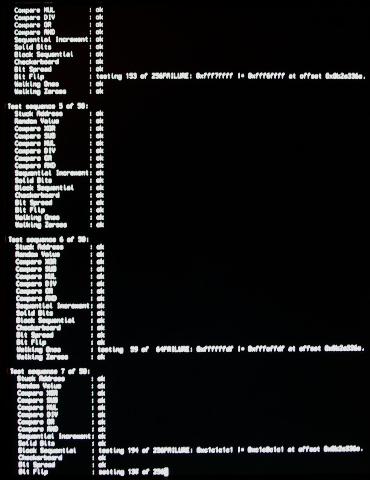
MemtestIn my last post, the Maxtor OneTouch drive was the prime suspect of the spontanious crashing of the Mac. Tonight the Mac mini crashed again, but this time without the Maxtor connected to it. So I set out to do a thourough memory test in single user mode, running memtest. And after a few iterations it was there: The dreaded memory failure. I guess I have to bring my mini back to the store to get replacement memory.Intermitting problems like this are terrible. They are hard to find, and you loose all trust in your computer, saving every 3 seconds, hoping you don’t loose anything. If the external drive was really to blame, I would seriously have doubted the implementation of the USB drivers, because the system crashes without warning, without logging or anything. A memory failure was actually the more plausible casue all the time, since the kernel just stops because the processor(s) reach a part of the memory where there was supposed to be code, but has become garbage. To be able to log, the processor has to execute code.

Apple, Hardware

Mac Mini Crash: cause located

Posted on 2006-05-04 By rolfje 1 Comment on Mac Mini Crash: cause located

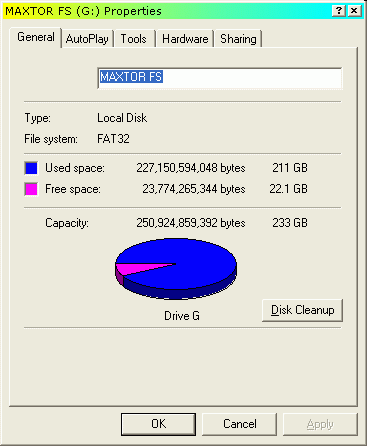
Windows screenshot showing Maxtor drive statsToday I spent some more time using Google to find information on why my Mac suddenly crashed. I am now 99% that the cause of this all is my Maxtor OneTouch 250GB drive, which was formatted as one big Fat32 partition (screenshot). Although I connected it to a friend’s iMac for a short period without problems, and it has worked on my Mac mini for a while, I keep finding discussions about people with crashed Macs. I have not installed the Maxtor software, so that’s not the problem.I have disconnected the Maxtor drive last Saturday, and my Mac has been up and running ever since, without problems. I can almost rule out memory related issues, because when I startup Eclipse while running iMovie, iDVD, Thunderbird, Firefox, iTunes, Clutter and TextWrangler (yes all at the same time), the system keeps on running. In fact, it is still responding to user input as if I had only one of those programs running. Only very minimal swapping with 2GB memory, and when swapping, OS X is very efficient about it.

Now, my plans are as follows:

  1. Only connect the maxtor to a PC while it is still Fat32.
  2. Share the drive on the PC, and try to empty it as much as possible (move data to Mac and the fileserver)
  3. Run Rember in single user mode for a few iterations this weekend to rule out memory problems.
  4. Decide on a filesystem to use on the Maxtor, and reformat it.
  5. Re-connect the Maxtor OneTouch to the Mac and see if the gremlin is killed.

It is very likely that the drive is going to be formatted with the “Mac Os Extended” filesystem, but I’m not sure about journalling yet. The disadvantage of all this is that the drive can not be used to transfer files between a PC and a Mac.

Still it feels funny. Some people actually can create 100GB+ Fat32 partitions they can use on their Macs. I can read and write to the drive too, but at some point my Mac decides it has been enough and kills itself (probably after finding the windows crud 😉

Sorry for the linking-frenzy, I had a lot of links I wanted to share with you.

Apple, Hardware

Dodenherdenking (2)

Posted on 2006-05-04 By rolfje No Comments on Dodenherdenking (2)

Vorig jaar heb ik mij aardig druk gemaakt over de abnormale manier waarop steeds meer mensen met dodenherdenking omgaan. Dit jaar was mijn ervaring gelukkig een stuk prettiger. Ik heb een klein stukje van de herdenking op de dam gezien, en dat was duidelijk een stuk beter dan vorig jaar. De taptoe werd foutloos en netjes geblazen, zelfs toen er (hoorbaar) iets omviel. Chapeau. Ook het inzetten van het volkslied waarbij mensen spontaan mee begonnen te zingen was erg goed om te horen.

Na de herdenking ben ik overgestapt op de uitzending vanaf de Grebbeberg. Minder (geen) toespraken, een stuk beter. Van mij mag het commentaar bij de uitzending ook nog weg, dat past beter bij het “geen toespraken” beleid en zorgt ook voor minder gewauwel “kijk er staan veel mensen”… Ja dat zie ik! Geluid uit, en probleem opgelost.

Nee (nogmaals) ik ben geen herdenkinsfanaat, maar ik vind dat mensen wel weer eens wat meer op hun gedrag, respect en elkaar mogen gaan letten. Bijvoorbeeld: Prachtig als je op je blog schrijft dat je je irriteert aan aggressieve weggebruikers, maar geef je ook het goede voorbeeld als je in je auto zit?

“A people that values its privileges above it’s principles soon loses both” – Dwight D. Eisenhower

Ok, genoeg gezeurd. Zennnn.

Uncategorized

Eclipse on Intel Macs

Posted on 2006-05-03 By rolfje No Comments on Eclipse on Intel Macs

Eclipse looks really nice on OS X. I can tell, I have it running on my mac Mini duo core. If you have problems getting it to start, and the logfile complains about linker errors, chances are you have the PPC version of the eclipse app file. To check this, Ctrl-click on the eclipse.app file. If it doesn’t say “(Universal)” somewhere next to “Type:”, then you need to download a newer version. Get the Eclipse 3.2 RC2 or higher, and make sure you download the “Mac OSX (Mac/Carbon)” version.

Read More “Eclipse on Intel Macs” »

Apple, Software

Great Read: The Graphing Calculator Story

Posted on 2006-04-29 By rolfje No Comments on Great Read: The Graphing Calculator Story

On one of my Google quests, I stumbled upon a great story about a few guys who got fired by Apple, but continued to sneak in and out of the building, finishing the software they had been working on. It is a great read, and I think it would make a nice adventure movie. It will probably will not be a box office hit, because the rest of the world does not know what programmers feel when being “in the zone”. It will probably end up in DVD shelves next to Office Space, one of my favourites.

I really enjoyed reading The Graphing Calculator Story, I hope you do too! Be sure to check out the screenshots 🙂

Fun

Apple OS X crash when importing in iMovie

Posted on 2006-04-29 By rolfje No Comments on Apple OS X crash when importing in iMovie

Just now, I had a terrible experience with my new Mac Mini. It crashed on me, two times in a row. It did this while importing a movie from a Sony Handycam with iMovie. During the import, suddenly the screen goes blank, and the machine does a “hard boot”. I restarted iMovie, dragged the imported files from the trashcan and continued as normal. But now I’ve noticed that my Spotlight is no longer returning search results. Looking for “Terminal” resulted in amsolutely no results at all.

I checked the /var/log/system.log for errors, but I can only find the things logged during boot. I expected to find some kind of error just prior to the unscheduled boot, but there is none. The problem is so “hard” that the system doesn’t even get (or takes) the time to write information about it.

I tried to repair the Spotlight database with the tips found here, and found the solution. Open the Terminal (from Application/utilities) and do the following (requires root password, be carefull!):

rolf:/var/log rolf$ sudo mdutil -E /
Password:
/:
        Volume index removed.  Index will be rebuilt automatically.
rolf:/var/log rolf$ sudo mdutil -i off /Volumes/MAXTOR\ FS/
/Volumes/MAXTOR FS/:
        Indexing disabled for volume.
rolf:/var/log rolf$ sudo mdutil -E /Volumes/MAXTOR\ FS/
/Volumes/MAXTOR FS/:
        Volume index removed.

Yes, you noticed correctly, I turned off indexing on my Maxtor 250 USB disk and cleaned it’s database as well. Spotlight indexes USB disks, and I thought it best to focus on indexing the system disk first.

After doing this I waited for Spotlight to finish indexing. You can tell when it’s finished by clicking on the magnifying glas. It takes about 2-3 minutes to finish on my machine. After it finished I still had no results. To give the system a chance to clean up and restart I shut it down, and powered it back up. Problem solved! Spotlight works fine again (phew).

Oh and another tip: don’t minimize iMovie when importing a movie from your camera, it will stop importing, but leaves the tape running, letting you think it is still working fine.

It seems that although OS X is more stable than Windows, and can cope better with unexpected reboots (never lost a file during this whole adventure), it is not entirely bullet proof. If I find a way to avoid reboots in iMovie I’ll let you know. Smaller projects and more saving is the way to go for now.

Apple

Connecting with different users to 1 server (2)

Posted on 2006-04-28 By rolfje No Comments on Connecting with different users to 1 server (2)

This is a simple followup after my last post. Pim did also look into this, and made a script which doesn’t pop up finders by simply calling “mount”. There is only one minor glitch: the script pops up an error when the mount already exists. With my brilliant programming expertise, I quickly solved that:

try
	mount volume "cifs://KAGE/iTunes" as user name "iTunes" 
                                          with password "yourpasswordhere"
	mount volume "cifs://KAGE/incomming" as user name "Guest"
	mount volume "cifs://KAGE/foto" as user name "Guest"
on error errText number errNum
	(* Not the nice way, simply ignore errors. If the mount did
	   not work, the user needs to see what is going on. How?
	   Use Finder to mount, and it will give you the error *)
end try

This script will try to mount the drives, ignoring errors. Replace the servernames, usernames and passwords with your own. What you can do is run the script at logon, or every minute in a cron job. I checked /var/log/system.log, but the script does not generate errors there.

At the rate we’re going, maybe we’ll even solve the “re-mount drives on return from sleep” problem. Let’s see if we can find a wakeup event on which we can run the script.

Apple, Software

Connecting with different users to 1 server

Posted on 2006-04-27 By rolfje No Comments on Connecting with different users to 1 server

With my Mac mini in a Windows LAN, I have the following problem:

  1. I can add my (cifs windows) network shares to my login script (Preferences -> Accounts -> Login), but when the mac wakes up from sleep, they are gone.
  2. When I want to connect to 2 shares on the same server, but one with a different account than the other, it doesn’t work. On login, the system chooses one of the accounts and uses it to connect to both network shares.

I think both problems are terrible, and particularly the way you connect to a network share in Finder using a password is confusing to say the least. Searching the web reveals hundreds of posts of people having the same problems. One wonders why apple didn’t solve this already.

I made a simple workaround for this problem by copy/pasting some script from several websites into the script editor (sorry guys, I’m lazy). I then saved it both as application and as source. I use the script to mount the drives at logon, and re-mount them when the Mac wakes from sleep mode. Until I come up with a better idea, or somebody can point to a nicer “Apple way” solution, or Apple fixes this dreadful problem in OS X, here is my script:

tell application "Finder"
	open location "cifs://WORKGROUP;iTunes@KAGE/iTunes"
	open location "cifs://WORKGROUP;Guest@KAGE/incomming"
end tell

When running a script like this for the first time, the system asks you the passwords. Type them in and save them in your keyring. The next time they won’t be asked, and you have no readable passwords in your script. Nice. The downside of this script is that it opens a ton of finder windows. I have nosed around in Automator but can not find a way to close them automatically. I also tried to record a script, but that gave me an even more “unusable” script.

I hope this helps you too. If you think this can be done in a nicer way (without too much scripting) please let me know.

Update: Seems I was to quick about the keyring app. I did need to add passwords to the script (add “:password” after the userid without the quotes). Stupid machine does not understand what I want.

Apple, Software

Posts navigation

Previous 1 … 31 32 33 … 36 Next
         

Recent Comments

  • rolfje on Exit WordPress
  • Guus on Exit WordPress
  • rolfje on Exit WordPress
  • rolfje on Methode Buijs uitgelegd
  • LinkedIn is at Peak Enshittifaction – Will Chatham's Blog on Linked-In not really Opt-in?

Tags

Apple backup design DIY DRM eclipse environment fix Fun gmail google hacking hamradio Hardware helicopter iphone ipod iTunes Java Keynote linux modelling motorcycle music news opinion oracle osx photo photography programming repair review security Software technology Time Machine Twitter Ubuntu usability Utilities vacation vista windows Workshop

Categories

  • Apple (105)
  • Divorce (1)
  • Electronics (3)
  • Fun (57)
  • Games (7)
  • Hardware (72)
  • Microsoft (18)
  • Racing (15)
  • Software (138)
  • Uncategorized (68)
  • Workshop (20)

Archives

Brought to you without adds, banners, cookies or tracking. This one is on me. Yes, life can be this good. Pay it forward.

Copyright © 2026 www.rolfje.com.

Powered by PressBook WordPress theme