 I love to listen to podcasts in the car. It has a lot of benefits over other media types, has less commercials, and there is some pretty good content out there. Documentaries, stories, news, perfect for listening on your commute. There is one big downside to podcasts though, particularly with the podcasts produced by people who have no experience with audio. So I went on a mission to solve this.
The problem with non-professional (or claim-to-be-professional) podcasters is that they have no clue about audio levels and frequencies, and seem to think that if you buy an expensive microphone and mixer, everything will be good. Spoiler alert: it is not. A cheap microphone and a bit of skill outperforms any Rhode microphone any day. Before I go into problem solving mode, we need to figure out what the problem is.
The main problem: Audio levels
The most important problem with most podcasts nowadays seems to be that the audio levels are off in two distinctive ways. The most important one is that during an interview, the host is usually loud (making love to his expensive Rhode microphone), and the guest(s) are either sitting back in their chairs, vary their voice based on the emotions in the interview, don’t know where the microphones are, move around, or are given the cheaper microphones. This makes the podcast hard to listen to in a car, because the guest dissapears in the background noise while the host is so loud your eardrums almost bleed. The easiest solution to this is audio compression.
The second is the level overall. When you switch from radio to podcast, the podcasts are usually too quiet, so you have to turn up the volume all the way. That means that all the background noise in the amplifier of the car is also louder, the podcast will sound noisy, and switching back to the radio immediately explodes all speakers. The easiest solution to this is normalization.
The secondary problem: Thinking speech is music
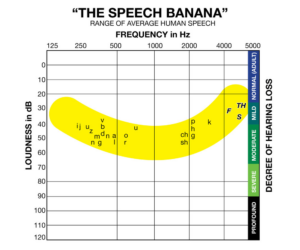 This is actually the same problem as the audio levels, but now across frequencies. Most kids seem to think that “bass is cool” and it gives you a “warm voice like the radio DJ”. Spoiler alert: It does not. The frequency which makes a radio DJ sound “warm” is not at all the frequency of your average trance house bass (not to mention the processing a radio DJ puts into making his voice sound like that, and the technical reason behind it, but I’ll not go into that).
Normal speech contains frequencies from 150 Hz to 4500 Hz. This is called the “speech banana”. Frequencies outside this band are not needed for clear speech, and any non-speech sounds inside this frequency makes the speech harder to distinguish, especially in a noisy car or with one earbud on a bicycle. This means that “turn up the bass” is a horrible idea, because it actually makes your speech harder to listen to. Adding background music to make it sound professional? Same result. Don’t do this unless you actually know what you are doing.
The third problem: post-production checks
 When podcast producers check their podcast while editting, they usually make a big mistake: Using expensive earphones on their untrained ears. The human ear can, in silent conditions, compensate for a pretty big difference in sound levels. If your ears are not trained to hear that, you will be quick to think that your podcast sounds just great, and you will upload your audio file with big audio level problems, making it almost impossible to listen to, and leaving you scratching your head why nobody listens to your second episode.
A good trick to check your audio podcast if you have untrained radio ears is to actually listen to it on speakers, preferably in a noisy car on the road. You will soon find out that half of your interview is impossible to make out from the background noise and the other half almost ruins your speakers.
The Don Quixote solution
Whenever I encountered this, I used to send a polite email explaining the problems with the audio levels, and even go through the trouble of post-processing an episode in Oceanaudio (a very nice tool, recommended) to have the original author hear the difference. On almost all occasions I did not even receive a reply. The only reply I had, and the only actual effort to fix it was with the “Crime de la Crime” podcast which sadly stopped a few episodes later.
The electronics solution
Because the world wasn’t changing, I decided to solve it locally by building a stereo audio compressor and bandpass filter and putting that in my car, in between the bluetooth receiver and the radio. First I built a simple audio compressor with 4 diodes and a few transistors, but the audio quality and the compression was not enough. Then I found a nice MAX4466 based micrpohone preamp and compressor on AliExpress, which seemed perfect for the job. I ordered two and got things to almost work.
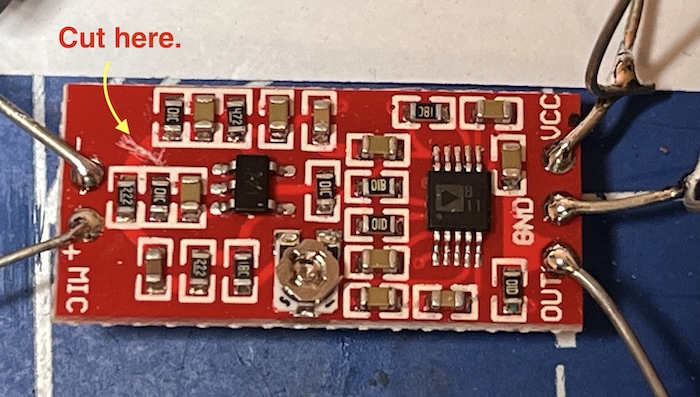
If you want to try this too: Disconnect the 1k2 resistor which feeds the microphone so that the input impedance is higher (line level impedance is around 10k, not 1k) and place a 180nF capacitor right at the input so that it forms a high-pass filter. This will give you decent compression and gets rid of any bass below 300 Hz, which is perfect. Adjust the output of the preamp so that the sound is not clipped. If you have an oscilloscope you can measure the clipping on the top-right pin of the potentiometer. The downside of this solution was however that there is no noisegate, so on silent parts in the podcasts you can hear all the noise your bluetooth receiver and your car makes. This is the same for podcasts which have a very low audio level to begin with. Also, it is not a stereo solution, and taking two will make the balance fade to left and right because both channels compress independently.
Eureka: The software solution
While tinkering with the electronics solution, it dawned on me that I was solving a problem that originates from digital audio files, which means I can also use software to post-process them like I did in the Don Quixote times. I just had to automate that work! So I got to work building a podcast compression and filtering tool. It is fairly simple, a python script which fetches rss feeds, fetches audio or video files, gets the audio, filters it, then compresses it, and then corrects the audio level. All with ffmpeg, all open source.
There is one problem with postprocessing audio files though: Copy rights. Yes I know it is strange, even if you attribute the original author, send more people to his feed, or give him money, none of that means that you have the right to re-distribute the audio file. You can process the file and listen to it, but only you, and nobody else. Personal use only. That means that you need a personal account with a password to access the audio files this software produces. The good news is that the Apple Podcast software supports basic authentication, which in my opinion is good enough to ensure that only you can listen to the audiofiles which were personalized for you and nobody else. Make sure you understand this before getting into trouble.
Enter “podfix”, the podcast post-processor which filters and levels video and audio files, hosts them both in a private, protected HTML page with local search capabilities and as Podcast RSS feeds which are easy to copy and readable by Apple Podcasts. The source for podfix is at github, and installation is simple if you are on MacOS or Linux:
git clone https://github.com/realrolfje/podfix.git
cd podfix
./podfix.sh --help
After the first run, and opening the index.html file you will see a “Copy RSS Feed” button. Click it, and then open your Apple Podcast app and on the top right in your library search for the button with the three dots. Click on it and there will be a “Subscribe using an URL” option. Use that, click “paste” and when the podcast app asks for a user and password, use the user and password you configured in podfix (see the example config files for the defaults if you haven’t done so already).
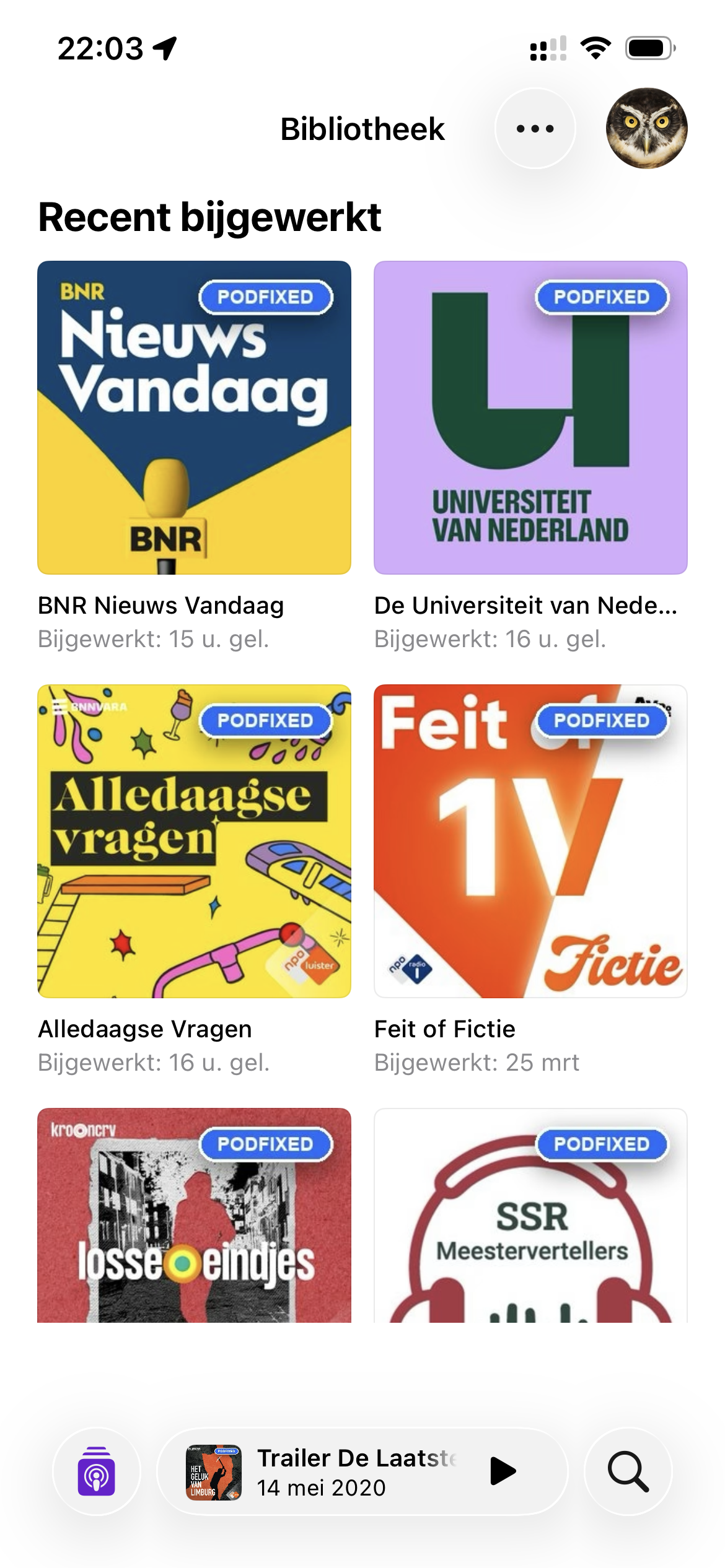 If you have cloud synchronization on, your phone will hapily clone the settings, and the result will be a podcast with the blue “podfixed” label in your feed, containing the post-processed audio.
The default configuration contains a bunch of (Dutch, sorry) example podcasts, documentation, a script to call from a nightly cron job and even a built-in webserver with basic authentication should you need it. Give it a try and let me know what you think, or send in your pull requests.
Happy listening, and don’t forget to subscribe to the artist channels, “like and subscribe” and join their Patreon programmes. Podcasting is awesome and we need to keep it alive!
Cheers,
Rolf
A quick check before normalizing is to review peak levels and listen to the quiet speaker separately; SirenMix (https://sirenmix.com/) can do that locally in the browser—disclosure: I’m its creator.
That is nice for the producers of podcasts, thanks for the tip. For automated downloads by listeners, podfix alone is enough, and downloads and fixes levels without having to look at it ever again. Install, point to a feed, and never look at it again 🙂
Podfix has been performing like a dream for months now, with over 30 podcasts updated daily. I am listening to it on my morning commute in the car and it has become volume-knob-twiddle free 🙂