According to about.com, my name in chinese is spelled as:

Funny to see that in Chinese, my name is only 1 character shorter.
According to about.com, my name in chinese is spelled as:
Funny to see that in Chinese, my name is only 1 character shorter.
All listed in one nice page on “Guide to OSX software for switchers”. Have fun!
Yup, you’ve guessed it. User error. There I was in my last post complaining that gmail was down, while actually my ADSL modem needed a good reset. At work, I could access gmail, and when I got home, I had the same problem as yesterday. I cleared the browser cache, still no result. Then I resetted my ADSL modem, and presto: I could log in again. Really strange error…
Sorry gmail, my mistake. But yes, I am going to back up my mail now 🙂
I really like iTunes. When you have 1 computer (an apple, that is ;-), and 1 place to store your music, it’s all you’ll ever need. It is easy to manage your music with, it puts your files in reasonably understandably locations (artist/album/track), has nice smart playlists and there are a lot of plugins available.
Great, gmail is down for days now. I really hope it will return soon, so I can back up that mail to my server. By going down, Google showed me how much I came to rely on them, while they’re actually unreachable when something happens, and I don’t even have backups of my own mails! I really like gmail and the way it organizes your mail by -ehrm- not organizing it (when it’s up, that is).
According to Sophos security, the whole world should switch to macs to get rid of the security problems. This would be great for business! Currently I do not order with companies who put up Word or Excel formatted price lists, simply because I can’t (and to some extent refuse) open them.
In the long run however, this would shift the security problem to the Mac side of the world. Why do Microsoft machines get attacked so often? Simple: because their user base is large, which means there are more Microsoft (black hat) hackers out there. Additionally, the targeted audience is large in numbers. When the whole world uses Macs, the black hat hackers will turn to OSX as target.
But then again, the security model of OSX is (luckaly) a lot better than that of a Windows machine so the damage done largely depends on how the system is secured by the user. At least on a Mac you have the means of securing stuff properly.
So here I am using iTunes on my Apple. So far so good. The downside is that I have an iBead as an mp3 player, so there are a few problems with that. First of all, iTunes only plays nice with the iPods (and a few other oddballs ;-). For me to put mp3’s on my iBead, I can drag them over from iTunes onto the USB drive, but when things’ don’t fit, it just doesn’t copy at all. Also, automatic random playlists aren’t that automatic.
So far, I can live with all these little problems. I can create a playlist limited to a particular size, empty my iBead and drag the mp3’s over. But when I play them on my iBead, the volume levels are far apart. In the old days I used mp3Gain on my PC to level out all volumes, which worked great. But iTunes has it’s own take on that: It stores a relative volume in the file, and iPods know how to handle this properly, adjusting the volume. My iBead however, doesn’t.
Tonight I went out to look for a tool which could adjust the volumes of my mp3’s on my Mac mini. And guess what? I found it! MacMP3Gain does it all, and it is currently processing my complete library, adjusting all volumes. It has a “nice” option so it won’t hog all processing power. I think it will be finished somewhere tommorow afternoon. It claims to be lossless, so I guess I can run it on my complete library every once in a while without having to worry about which files are new or not.
I am trying to decide what lens to buy for my Canon EOS 350D. The first descision to make is what focal length I need. To do this, I found a nice tool which can display statistical info about your photographs. It shows you how many foto’s you’ve made at certain focal lengths, with which aperture, ISO, metering, and other EXIF fields. It’s a windows only tool, and it’s called Smart Photo Statistics. It’s absolutely 100% free software and works as expected. It can even copy the graphs to the clipboard for you to use elsewhere.
I’m gathering statistics right now on all photo’s of all digital camera’s I’ve owned, to see what focal lentgths I need. Great tool!
Once in a while I like to take black and white pictures because the EOS has a nice built in set of color filters. The easiest example of a nice black and white photo where a color filter produces great results is the classic “blue sky with Yellow filter”. You should really check out the great tutorials on Cambridge in Color.
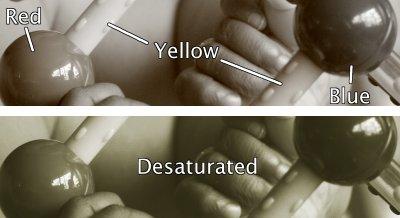
When shooting in B/W mode, I often use the “sepia” filter, to add a little warmth to the photo. A wierd thing I noticed lately about the EOS 350D (besides the film transport sound) is that “Sepia” mode is not really producing pure B/W Sepia images. There is color seeping through! In the top image, you can clearly see residues of red, yellow and blue in a photo of a baby toy (cropped for privacy reasons). The bottom image is converted to pure B/W on a computer and then sort of “Sepia”-d using a hue/saturation tool just for reference.
I read on some forums that camera effects are generally not as good as the effects in image processing programs like PhotoShop or GIMP. This is supposedly because speed/quality tradeoffs. I really like to spend more time with the camera than post-processing, so I’d like to keep using the in-camera effects. A great tip I read somewhere on a forum is to shoot in RAW+JPG mode. The JPG will have all the processing done by the camera, and the RAW will be the raw data from the sensor. Depending on the results of the in-camera effects, you either keep the JPG, or use the RAW image to do the effect in GIMP later on.
The Mac has been on for the past few days, even with the Maxtor FAT32 250GB drive connected, without problems. I hope it doesn’t break down again, because I’d have to bring it to a different Mac store and explain the whole thing again… Anyway, I was playing with iTunes and found a simple trick to find double entries.
Open a Terminal, go to the root of your iTunes music collection folder and type
find . -name "*1.mp3" -type f
This will give you a list of all tracks ending with “1.mp3”, which is how iTunes renames double-entries. Do not look at the filenames, but rather select the artist in iTunes with the double tracks, and use the “show double entries” in iTunes to do the rest.
It isn’t much, but it saves you the trouble of finding double tracks in your 8 zillion tracks 😉 .
Have fun!