Skip to content

www.rolfje.com

Category: Apple

“Instruments” – Application monitor

Posted on 2009-01-02 By rolfje No Comments on “Instruments” – Application monitor

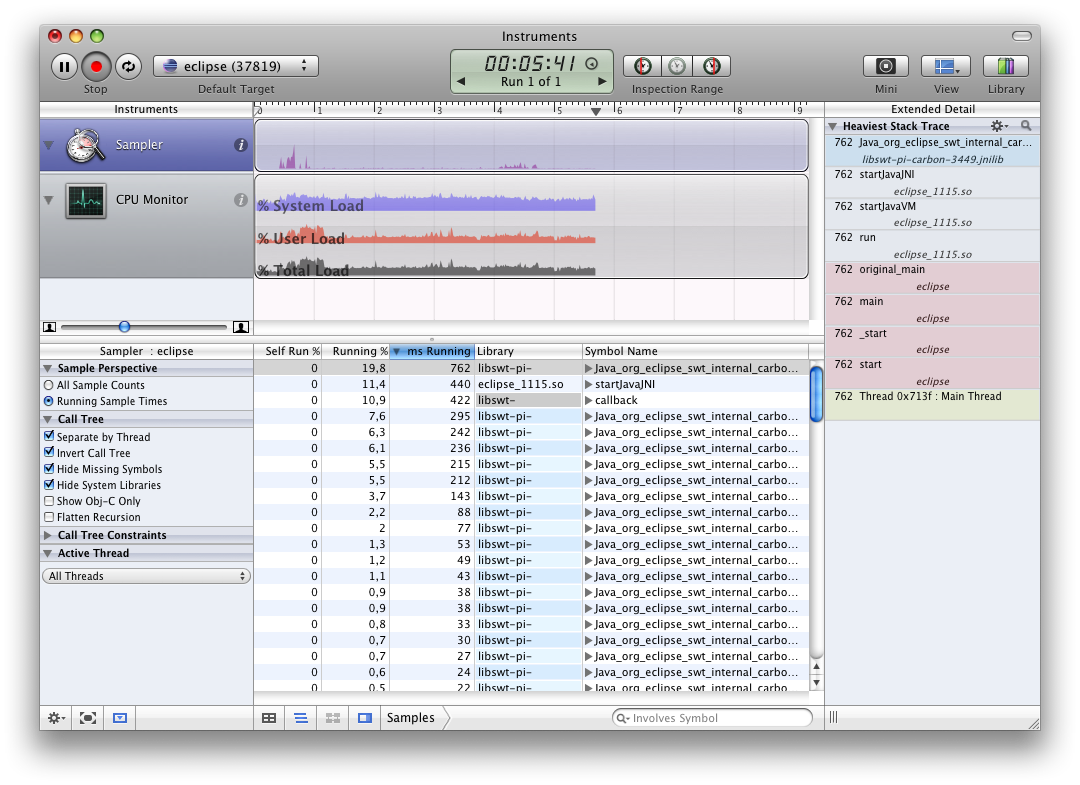
InstrumentsDid you know that your installation of Leopard comes with a built-in performance monitor? It’s called “Instruments” and you can attach it to any process currently running. In the screenshot you see here I attached it to an instance of Eclipse while running some unittests.

Instruments has some nice templates for you to choose from, and you can monitor CPU activity per thread, disk I/O, User Interface activity, Object allocations, and leaks. Just so you know, it might come in handy.
Apple, Software

How to add drivers to SQuirreLSQL.app

Posted on 2008-12-30 By rolfje 11 Comments on How to add drivers to SQuirreLSQL.app

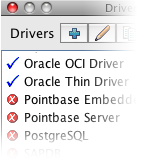
SQuireL SQL on OSX with Oracle driversIf you’re a SQuirreL SQL fan like me, and you use a Mac, you probably also want to know how to add a driver to the OSX version of the application. Most people just point to an external jar file, but you can also add drivers to the application bundle.  There’s not much to it, but it took me some time to discover that I actually had to edit the plist file in the bundle after adding the driver.

As you can see on the left, my SQuireLSQL.app now comes with the Oracle OCI and Thin driver built in, and because they are part of the application bundle, I can’t wreck my installation by misplacing jarfiles or reconfiguring classpaths. Nice.

If you want to drivers to your SQuireLSQL.app yourself, here’s what you need to do:

Read More “How to add drivers to SQuirreLSQL.app” »

Apple, Software

Eclipse 3.4.1, OSX and Java 1.6

Posted on 2008-12-28 By rolfje 2 Comments on Eclipse 3.4.1, OSX and Java 1.6

Eclipse application icon

I recently downloaded Eclipse 3.4.1 for Mac OSX, and tried starting it using the eclipse.app icon. It did not work, and I noticed a message in /var/log/system.log telling me that the JVM could not be loaded.

Read More “Eclipse 3.4.1, OSX and Java 1.6” »

Apple, Software

Hex color picker for OSX

Posted on 2008-12-24 By rolfje No Comments on Hex color picker for OSX

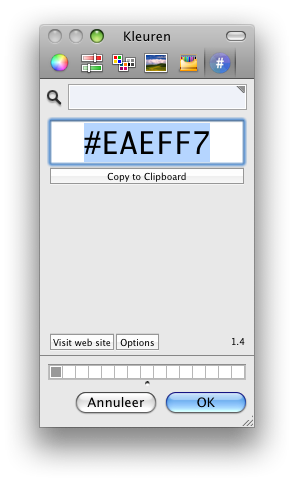
Hex Color Picker ScreenshotIf you’re working on some source code and you quickly need to insert a hexadecimal color code for a color you currently have on your screen, then here is a neat little trick I found:

First, install Hex Color Picker by Waffle software. It will add an extra option to the built-in OSX color picker to show you the selected color in Hex.

To reach the color picker, you usually start up any application which uses the standard OSX color picker and just choose “choose color”. What you can also do, is have the OSX color picker behave as a standalone application in 3 simple steps:

Read More “Hex color picker for OSX” »

Apple, Software

Wiimote Whiteboard

Posted on 2008-12-12 By rolfje 7 Comments on Wiimote Whiteboard

WiimoteWhiteboardFor people wanting to have an interactive whiteboard but don’t have the money, Johnny Chung Lee has found the solution. Using a Wiimote, he can track an infrared lightsource (like an LED) and use that to control the mousecursor. I tried some software on the Mac and the PC, and I actually got both to work without too much trouble.

Read More “Wiimote Whiteboard” »

Apple, Fun, Hardware, Microsoft

Replace your mousecable

Posted on 2008-11-04 By rolfje 4 Comments on Replace your mousecable

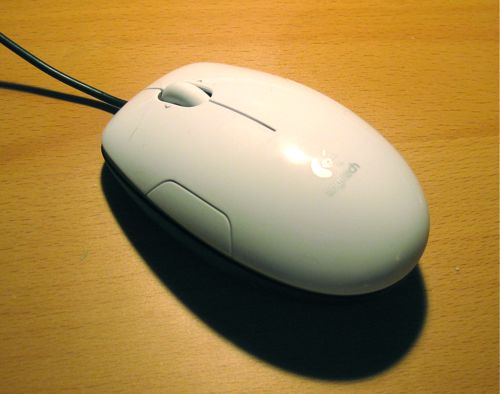
I recently tried to purchase a Logitech LS1 mouse from Logitech. After not hearing from them for 3 weeks, I ordered the same mouse at Dynabyte and got it within 5 days. Suddenly Logitech woke up and sent me another LS1 mouse. Because they don’t react to mails or calls, I had a spare LS1 to play around with.
I decided to replace the long, rigid cable with a short supple one. Here’s how you can do that, too.

Read More “Replace your mousecable” »

Apple, Hardware, Workshop

The iPhone buying experience

Posted on 2008-10-11 By rolfje 1 Comment on The iPhone buying experience

Ok so I’ve been blogging about the iPhone and it’s “apps” for a while now. After a lot of consideration and switching between Nokia and iPod touch, doing nothing and buying a 16GB 3G iPhone, I finally went for the latter. What a bittersweet experience.

Read More “The iPhone buying experience” »

Apple, Hardware

Attention to Detail

Posted on 2008-09-14 By rolfje No Comments on Attention to Detail

As I explained earlier, I think it is really important to go beyond the specs. It’s really important to put care and attention in your product. The new version of iTunes has a great (little) example of what I mean. I use Itunes to play music through both the computer speakers and a stereo in the livingroom, connected to an Airport Express.

In iTunes 7, when I added the Airport Express to the set of outputs while playing a song, the music stopped, and after a while resumed playing through all the selected outputs. I never minded the short silence, and was amazed at how Apple got all the outputs to play perfectly in sync.

In iTunes 8 things changed a tiny bit. When I select the Airport Express, the music keeps on playing on my computer, and after a few seconds the music also starts playing from the speakers in the living room. An still, the music is in sync.

It’s these little things, the amazing attention to detail, that give Apple products a tremendous “perceived value”.

That, and the Genius button ofcourse. 🙂

Apple, Software

A Bigger Time Machine without Changing History

Posted on 2008-09-07 By rolfje 104 Comments on A Bigger Time Machine without Changing History

I had a 160GB drive holding my Time Machine backups. Because I wanted to backup external disks, and still wanted to be able to travel about a year back in time, I bought a 1TB USB disk. Stephen Foskett wrote a great article about how he migrated his TimeMachine backup to a larger disk, but it’s lengthy and misses one essential step.

I decided to give you the short version, this blog post describes how I migrated Time Machine to the new disk without losing any data in 11 easy steps.

Read More “A Bigger Time Machine without Changing History” »

Apple, Software

OSX: Formatting a 1TB USB Drive

Posted on 2008-09-07 By rolfje 7 Comments on OSX: Formatting a 1TB USB Drive

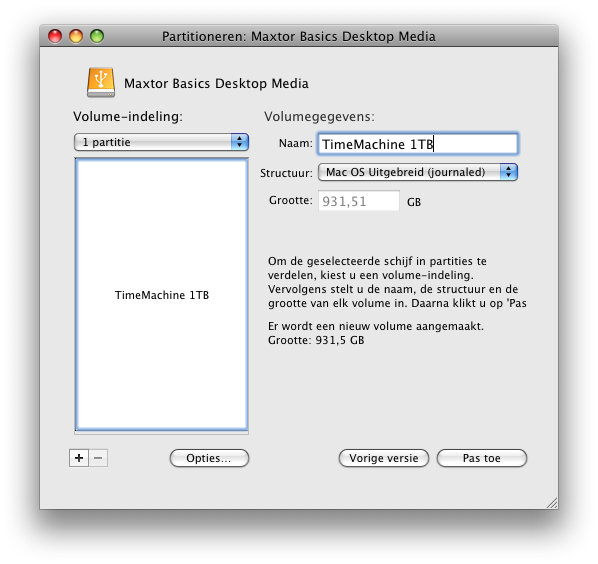
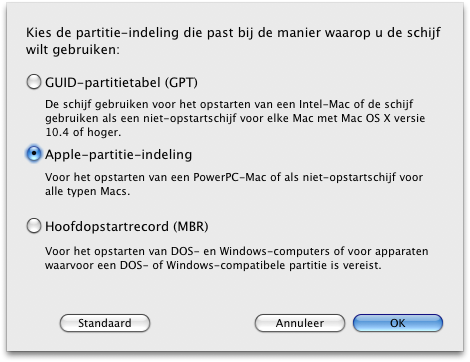
I just bought a Maxtor Basics 1TB drive, and found that I could not seem to format it using the Leopard Diskutility. Then, I found this page which contained the golden tip. I’ll save you some reading:

  1. Open Apple’s Disk Utility
  2. Click on the drive (not the partition in it, if there is any), and select “Partitioning”.
  3. Select “1 partition” and then press “Options”.
  4. You’ll see that “MBR” is the default, which is what’s causing the problem. Select the middle option “Apple Partition” and you’re good to go.

Screenshots included. It’s in Dutch, but the location of the buttons are identical for all languages.

Apple, Hardware, Software

Posts navigation

Previous 1 … 3 4 5 … 11 Next
         

Recent Comments

  • rolfje on European alternatives to AWS/Azure/GoogleCloud
  • rolfje on Are you de-skilling?
  • rolfje on Are you de-skilling?
  • rolfje on Exit WordPress
  • Guus on Exit WordPress

Tags

Apple backup design DIY DRM eclipse environment fix Fun Garmin gmail google hacking hamradio Hardware helicopter iphone ipod iTunes Java Kawasaki Keynote linux modelling motorcycle music news opinion oracle osx photo photography programming repair review security Software technology Time Machine Ubuntu usability Utilities vacation windows Workshop

Categories

  • Apple (107)
  • Divorce (1)
  • Electronics (4)
  • Fun (57)
  • Games (7)
  • Hardware (73)
  • Microsoft (18)
  • Racing (16)
  • Software (143)
  • Uncategorized (68)
  • Workshop (22)

Archives

Brought to you without adds, banners, cookies or tracking. This one is on me. Yes, life can be this good. Pay it forward.

Copyright © 2026 www.rolfje.com.

Powered by PressBook WordPress theme