 I was happy to see Steve return on the Apple keynote of 9 September, because boy does Apple need somebody with clear vision. The introductions on the new iPod line are all over the place. Let me tell you why I think Steve has not been running the operation for the past few months:
Category: Apple
iTunes 9: “Genre-Artist-Album” panes restored
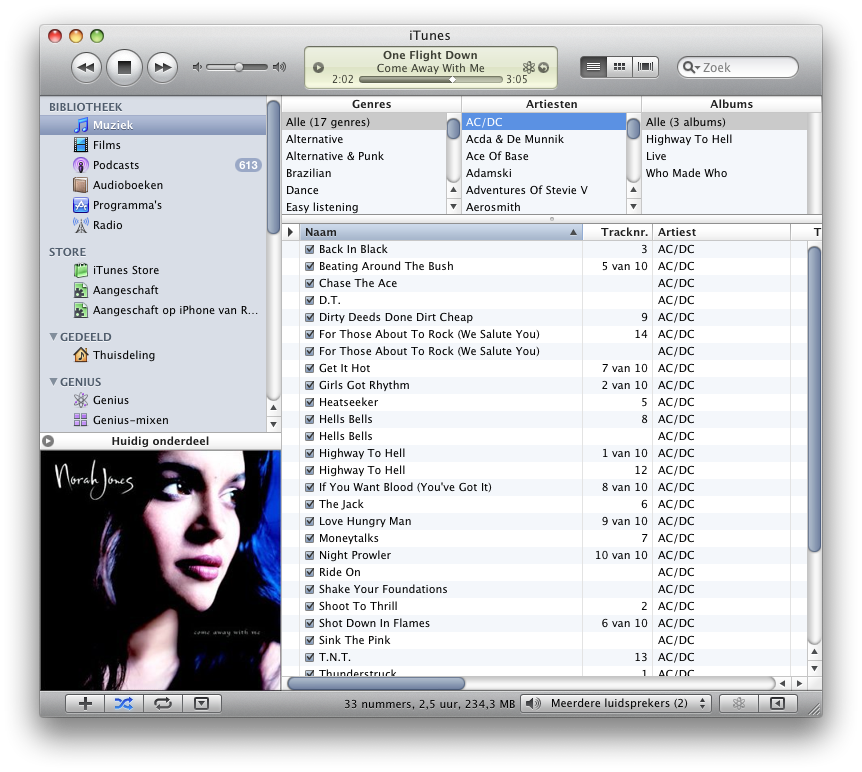 What I loved about iTunes is the three pane “Genre-Artist-Album” on top of my music list. It allowed me to quickly go through my music and find that great Anouk album I was looking for. After installing iTunes 9, it was gone. And I was sad. But I found a way to get it back.
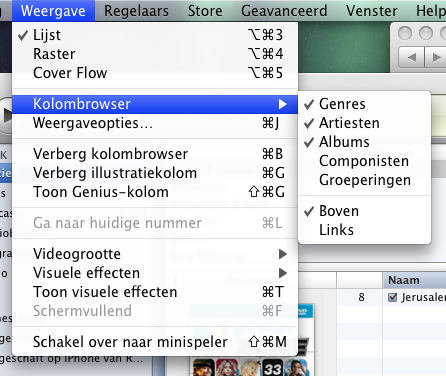
Look at this screenshot (sorry, it’s in Dutch). In iTunes, select “View”, “Show Column Browser”. Now, put it on top by selecting “View”, “Column Browser”, “Top”. Voila, your trusted browser is at the top. You may need to add “Genre” and “Album” there, but you’ve already seen the options for that now, have you? 😉
Omniplan Progress Tracking Tip
 During one of my Omniplan sessions at work, I discovered that the resource leveling was acting a bit funny, where people were not planned to do any work for days. I played around with a fake planning and soon discovered the problem and several solutions to it.
Starting Java app from Applescript
Suppose you have a Java Swing application which you can start by typing the following on the command line:
java -jar myTerrificSwingApp.jar
If you want to make that application start from the Finder in OSX, there are a lot of options which range from ugly to convoluted. If you need a quick fix, here’s how to do it.
How to put DVD’s on your iPhone (for free)

A lot of companies like to sell you applications to put DVD’s on your iPhone. Usually these apps are just wrappers around existing tools, and are pretty expensive if you consider you can do it for free. And you don’t need to be a computer wizard either! The steps are simple:
- Use Handbrake to rip the DVD to iPhone format
- Drag the generated mp4 file into iTunes
- Sync it to your iPhone like all other content
To show you exactly how this is done, I’ve written up this “babystep-by-babystep” tutorial. Let me show you how I ripped “For A Few Dollars More” and put it on my iPhone:
Disclaimer: The DVD I ripped is bought and payed for. This article does not relief you of your responsibility to obey the law, so please be careful. And be nice, don’t pirate.
DLNA on OSX, done right
 My wife bought me a playstation 3 last year, and I’ve enjoyed many hours of gaming on it, finishing Tomb Raider underworld, and now making decent progress in Ratchet and Clank: Tools of Destruction.

I was a bit sceptical about the DLNA capabilities of the PS3, because I read a lot of bad news on this fairly new “Interoperability Guidelines” concept. It sounded like a lot of trouble to go through to simply watch the photos and home videos on a TV. For weeks, I was not able to find a single site telling me how to install a DLNA server on my Mac, or where to find a decent one.
Altgough they’re hard to find, there are a few OSX DLNA servers out there. One of them is actually very good. Here’s what I found:
Get well soon
 Dear Steve,
Congratulations on the 25th aniversary of the Macintosh. I was sorry to hear that you are not feeling well and took some time off. Try not to worry about work, enjoy the time with your family and take care.
Get well soon,
Rolf
Remote Desktop Connection updated
“Remote Desktop Connection.app” allows you to see the desktop of a remote Windows machine on your mac. This application will not update itself automatically, unless you have it installed as part of the Microsoft Office for Mac suite. If you’ve downloaded the 1.0.3 version you probably did not notice that “Remote Desktop Connection.app” was updated somewhere last year by microsoft.
You can find the latest version of Remote Desktop Connection on the Microsoft Mactopia site. Version 2 is an improvement over 1.0.3 (which I had). Notable differences are:
- Nicer configuration screens, makes configuring your resolution and shares easier.
- Now a Universal Binary, which should improve performance on Intel Macs. I have not noticed improvement, but that’s probably because the network is the bottleneck.
- Supports the new RDC 6.0 protocol used by Vista.
- Can do authentication of the remote machine (if it’s a Vista machine).
- Your Mac printer can be exposed to the Windows machine so you can print documents on your local printer.
I played with it for a while, and apart form the new looks I can not say it’s very different from the 1.0.x version. It could load my old RDC 1.0.3 configuration files. If you need to connect to a Windows desktop from your Mac, this does the job just fine.
Automount network shares
 There is a nice and clean way to automatically mount network shares each time you log into your Mac. It’s called the “Bonjour Mounter”, a simple application which runs on login, and mounts the drives you configured it to mount. No more, no less.
Free OSX Wallpaper